> ## Documentation Index
> Fetch the complete documentation index at: https://help.miyaip.com/llms.txt
> Use this file to discover all available pages before exploring further.

# 使用 Shadowrocket 配置 iPhone 中转代理

> 准备 iPhone 设置，扫描 MiyaIP 中转代理二维码，并使用 Shadowrocket 连接和检查出口 IP。

使用美区 Apple ID 下载 **Shadowrocket（小火箭）**，然后按以下步骤配置 MiyaIP 中转代理。

## 准备 iPhone

<Steps>
  <Step title="关闭定位服务">
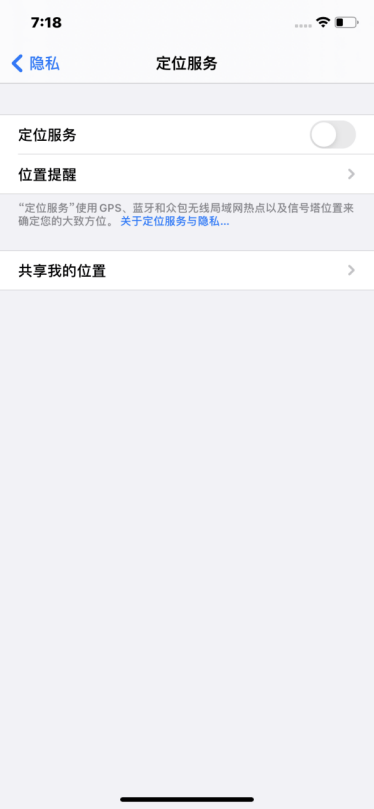
    打开 **设置**，在 **隐私** 中找到 **定位服务**，将其关闭，避免应用读取你的地理位置。

    <Frame>
      <img src="https://mintcdn.com/miya-556b3641/O3phwvGYo_Abg4HD/images/tutorials/m_ios_sr_1.png?fit=max&auto=format&n=O3phwvGYo_Abg4HD&q=85&s=e69f33dad9f61d11afe63274e441b83e" alt="在 iPhone 设置中关闭定位服务" style={{ width: "100%", maxWidth: "480px" }} width="374" height="809" data-path="images/tutorials/m_ios_sr_1.png" />
    </Frame>
  </Step>

  <Step title="调整日期、时间、语言和地区">
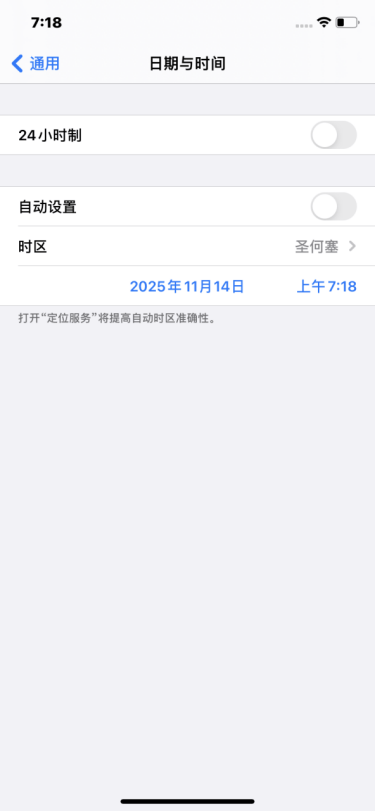
    找到 **通用（一般）**，将手机的日期与时间设置为目标国家或地区的日期与时间。将语言改为简体中文以外的语言，优先选择目标国家的语言，并将地区改为目标国家或地区。

    <Frame>
      <img src="https://mintcdn.com/miya-556b3641/O3phwvGYo_Abg4HD/images/tutorials/m_ios_sr_2.png?fit=max&auto=format&n=O3phwvGYo_Abg4HD&q=85&s=686d4212af4bf08cdcf9ead45c95a419" alt="在 iPhone 通用设置中调整日期、时间、语言和地区" style={{ width: "100%", maxWidth: "480px" }} width="375" height="812" data-path="images/tutorials/m_ios_sr_2.png" />
    </Frame>
  </Step>
</Steps>

## 连接中转代理

<Steps>
  <Step title="扫描并导入 Shadowrocket 二维码">
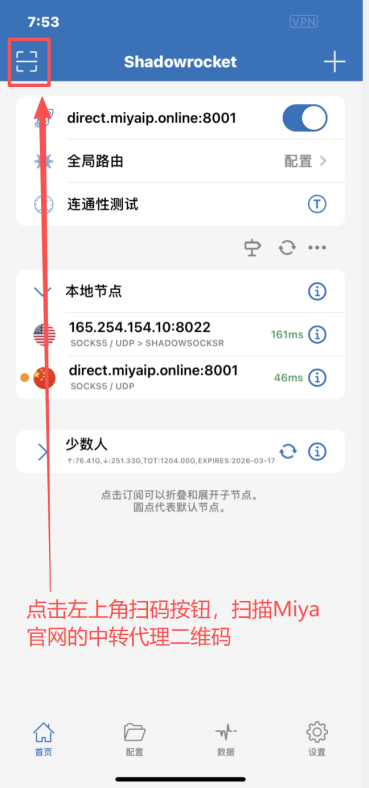
    打开 Shadowrocket，点击左上角的 **扫码按钮**。在 MiyaIP 官网打开已购 IP 的中转代理二维码，选择 **Shadowrocket**，扫描对应二维码并导入节点。

    <Frame>
      <img src="https://mintcdn.com/miya-556b3641/O3phwvGYo_Abg4HD/images/tutorials/m_ios_sr_3.png?fit=max&auto=format&n=O3phwvGYo_Abg4HD&q=85&s=dcf438220a0b882e9752ff5b3e377d04" alt="点击 Shadowrocket 左上角的扫码按钮" style={{ width: "100%", maxWidth: "480px" }} width="369" height="788" data-path="images/tutorials/m_ios_sr_3.png" />
    </Frame>
  </Step>

  <Step title="启动代理连接">
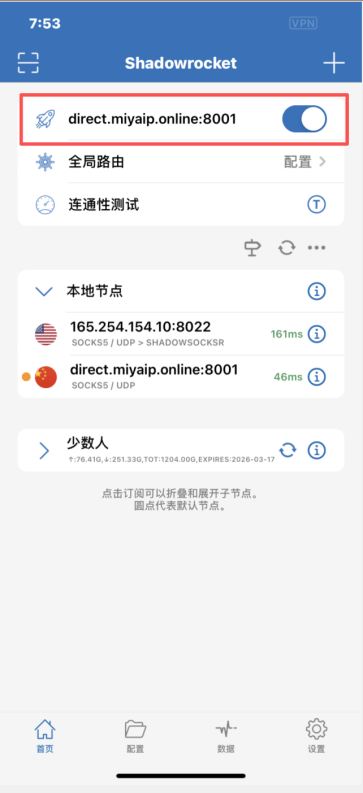
    导入节点后，点击顶部的 **小火箭按钮**，启动代理连接。

    <Frame>
      <img src="https://mintcdn.com/miya-556b3641/O3phwvGYo_Abg4HD/images/tutorials/m_ios_sr_4.png?fit=max&auto=format&n=O3phwvGYo_Abg4HD&q=85&s=d637b1826e193da72ed7064b4d261ae3" alt="点击 Shadowrocket 顶部的小火箭按钮启动连接" style={{ width: "100%", maxWidth: "480px" }} width="363" height="793" data-path="images/tutorials/m_ios_sr_4.png" />
    </Frame>
  </Step>

  <Step title="检查出口 IP">
    在 Google 浏览器的网址栏输入 [whoer.net](https://whoer.net)，检查显示的出口 IP 和地区是否与你配置的 MiyaIP 代理一致。
  </Step>
</Steps>