> ## Documentation Index
> Fetch the complete documentation index at: https://help.miyaip.com/llms.txt
> Use this file to discover all available pages before exploring further.
# 静态代理验证教程:curl 与 Python 配置
> 获取 MiyaIP 静态代理连接字段,用 curl 和 Python 比较直连基线与代理出口、检查认证和短时出口连续性,并按症状排查故障。
先配置一个静态住宅代理,再核对实际出口与后台分配。使用下面的流程验证连接、认证及短时间内的出口连续性;IP 查询结果不包含地理位置验证,也不能证明长期可用性。
## 准备连接参数
打开[静态住宅代理的已购 IP](/zh/proxy/static-residential/quick-start)。记录以下字段,先确认套餐仍有效。
| 字段 | 获取位置 | 使用前检查 |
| - | - | - |
| 协议 | 代理记录中的协议说明 | 使用端点与客户端共同支持的 HTTP 或 SOCKS5 |
| 主机与端口 | 原始代理或中转代理详情 | 连接主机不是出口 IP;后台端口不是客户端本地监听端口 |
| 用户名与密码 | 对应代理的认证字段 | 分开复制,两项都按密钥处理 |
| 出口 IP | 独立的出口 IP 详情 | 用作 `EXPECTED_EXIT_IP`,与 IP 查询结果比较 |
| 国家或州 | 分配详情 | 核对业务所需地区,另行验证定位 |
| 到期时间 | 已购 IP 或套餐详情 | 先排除到期,再检查网络与客户端 |
从中国大陆网络使用 **原始代理** 时,需要先具备可用的海外网络路径;使用 **中转代理** 时,使用后台提供的中转主机与端口。复制完整连接字段的流程见[购买与配置快速开始](/zh/proxy/static-residential/quick-start)。不要把中转主机、原始连接 IP 和最终出口 IP 混为一项。
## 从配置到验证
选择与工作所需地区相符的 IP。确认客户端支持所分配的协议,以及用户名、密码认证。记录套餐到期时间与并发限制。
在 **已购 IP** 中展开对应的 **原始代理** 或 **中转代理**,分别复制主机、端口、用户名和密码。完整代理字符串通常按下面的顺序显示;凭据含冒号时,优先使用独立字段,不要只凭分隔符拆分。
```text theme={null}
PROXY_HOST:PROXY_PORT:PROXY_USER:PROXY_PASSWORD
```
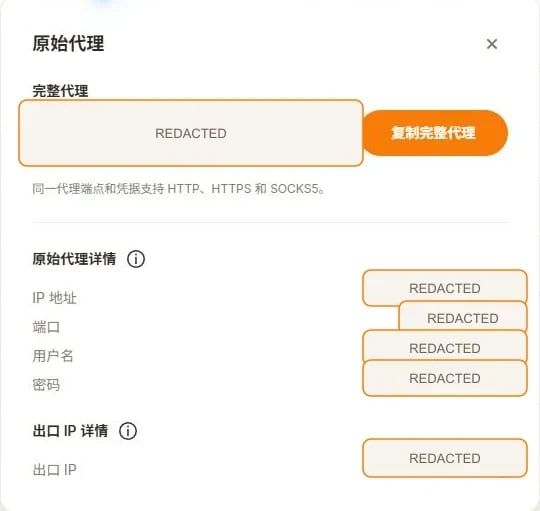 图中连接值已脱敏。界面标签可能随版本变化,以当前后台字段为准。
下列值都是占位符。把主机与端口替换为所选模式的字段,把 `EXPECTED_EXIT_IP` 替换为 **出口 IP**。凭据从密钥管理工具加载,或在当前终端交互输入;不要把真实凭据保存在共享脚本或终端历史中。
```bash Bash theme={null}
export PROXY_SCHEME="http"
export PROXY_HOST="YOUR_PROXY_HOST"
export PROXY_PORT="YOUR_PROXY_PORT"
export PROXY_USER="YOUR_PROXY_USER"
export PROXY_PASSWORD="YOUR_PROXY_PASSWORD"
export EXPECTED_EXIT_IP="YOUR_DASHBOARD_EXIT_IP"
export VERIFY_INTERVAL_SECONDS="30"
```
```powershell PowerShell theme={null}
$env:PROXY_SCHEME = "http"
$env:PROXY_HOST = "YOUR_PROXY_HOST"
$env:PROXY_PORT = "YOUR_PROXY_PORT"
$env:PROXY_USER = "YOUR_PROXY_USER"
$env:PROXY_PASSWORD = "YOUR_PROXY_PASSWORD"
$env:EXPECTED_EXIT_IP = "YOUR_DASHBOARD_EXIT_IP"
$env:VERIFY_INTERVAL_SECONDS = "30"
```
HTTP 设置 `PROXY_SCHEME=http`。SOCKS5 使用 `socks5` 在本地解析目标域名,或使用 `socks5h` 交给代理解析。选择后台支持的协议;协议与端口不能随意互换。详见[HTTP 与 SOCKS5](/zh/guides/protocols)。
先执行直连命令,再只执行你的端点支持的代理命令。`--proxy-user` 将认证与端点分开。`--noproxy "*"` 绕过 curl 的代理设置;`--noproxy ""` 防止 `NO_PROXY` 把代理目标排除。Windows 使用 `curl.exe`,下方 PowerShell 命令要求 7.3 或更新版本以正确传递空参数。
```bash Bash theme={null}
# Baseline: do not inherit a curl proxy
curl --fail --show-error --silent --noproxy "*" \
--connect-timeout 10 --max-time 30 \
"https://api.ipify.org?format=json"
# HTTP proxy; the destination still uses HTTPS
curl --fail --show-error --silent --noproxy "" \
--connect-timeout 10 --max-time 30 \
--proxy "http://${PROXY_HOST}:${PROXY_PORT}" \
--proxy-user "${PROXY_USER}:${PROXY_PASSWORD}" \
"https://api.ipify.org?format=json"
# SOCKS5 with local destination DNS
curl --fail --show-error --silent --noproxy "" \
--connect-timeout 10 --max-time 30 \
--proxy "socks5://${PROXY_HOST}:${PROXY_PORT}" \
--proxy-user "${PROXY_USER}:${PROXY_PASSWORD}" \
"https://api.ipify.org?format=json"
# SOCKS5 with proxy-side destination DNS
curl --fail --show-error --silent --noproxy "" \
--connect-timeout 10 --max-time 30 \
--proxy "socks5h://${PROXY_HOST}:${PROXY_PORT}" \
--proxy-user "${PROXY_USER}:${PROXY_PASSWORD}" \
"https://api.ipify.org?format=json"
```
```powershell PowerShell theme={null}
# PowerShell 7.3+ preserves the empty --noproxy argument
curl.exe --fail --show-error --silent --noproxy "*" --connect-timeout 10 --max-time 30 "https://api.ipify.org?format=json"
curl.exe --fail --show-error --silent --noproxy "" --connect-timeout 10 --max-time 30 --proxy "http://${env:PROXY_HOST}:${env:PROXY_PORT}" --proxy-user "${env:PROXY_USER}:${env:PROXY_PASSWORD}" "https://api.ipify.org?format=json"
curl.exe --fail --show-error --silent --noproxy "" --connect-timeout 10 --max-time 30 --proxy "socks5://${env:PROXY_HOST}:${env:PROXY_PORT}" --proxy-user "${env:PROXY_USER}:${env:PROXY_PASSWORD}" "https://api.ipify.org?format=json"
curl.exe --fail --show-error --silent --noproxy "" --connect-timeout 10 --max-time 30 --proxy "socks5h://${env:PROXY_HOST}:${env:PROXY_PORT}" --proxy-user "${env:PROXY_USER}:${env:PROXY_PASSWORD}" "https://api.ipify.org?format=json"
```
命令应返回含 `ip` 的 JSON。检查每条命令的退出码:Bash 为 `$?`,PowerShell 为 `$LASTEXITCODE`。非零表示请求失败,不能把空输出或错误页面当成出口 IP。先核对直连与代理是否不同,再与后台 **出口 IP** 比较。
新建隔离的浏览器配置,选择同一协议,把主机、端口、用户名和密码分别填入对应字段。首次检查时排除其他系统代理或 VPN 的影响,运行客户端自带的代理检查,再访问获准使用的 IP 查询页面。
手机客户端按设备与连接模式选择教程:
* iOS Shadowrocket:[原始代理](/zh/native/ios-shadowrocket) / [中转代理](/zh/relay/ios-shadowrocket)
* Android NekoBox:[原始代理](/zh/native/android-nekobox) / [中转代理](/zh/relay/android-nekobox)
* Android v2rayNG:[原始代理](/zh/native/android-v2rayng) / [中转代理](/zh/relay/android-v2rayng)
使用 AdsPower 时,参考[静态代理配置](/zh/integrations/adspower-static-proxy)。
使用 Python 3.9 或更新版本。安装带 SOCKS 支持的 Requests,HTTP 与 SOCKS5 可使用同一示例。
```bash theme={null}
python -m pip install "requests[socks]==2.*"
```
将下方完整代码保存为 `static_proxy_check.py`。在设置上述变量的同一终端执行:
```bash theme={null}
python static_proxy_check.py
```
脚本先直连查询,然后创建三个独立代理会话;相邻代理请求之间,先完成上一次请求,再等待 `VERIFY_INTERVAL_SECONDS`,默认 30 秒。第三次请求后再次直连查询。每个会话设置 `trust_env=False`,避免继承环境代理与 `.netrc`;系统 VPN 或透明转发仍可能影响基线。
脚本对 URL 中的用户名和密码进行百分号编码,并分别设置连接和读取超时。它只输出安全诊断,不打印完整代理 URL 或原始异常。代理、TLS、超时、HTTP 状态、JSON 格式、出口比较失败时返回非零退出码。
成功必须满足:前后直连基线一致;三次代理出口一致;代理出口与两次直连不同;设置 `EXPECTED_EXIT_IP` 时,三次都与其相同。不满足时,检查当前路由和后台分配后再重试。
如果没有设置 `EXPECTED_EXIT_IP`,输出 `expected_exit_matches=not_checked`,仅能验证短时连续性和基线差异,不能确认后台分配。结束后清除当前终端中的用户名和密码变量。
## 完整 Python 示例
[下载 Python 示例](/examples/static_proxy_check.py),或将下方代码保存为 `static_proxy_check.py`。
```python static_proxy_check.py theme={null}
"""Verify a static proxy without logging credentials.
Python 3.9+. Install: python -m pip install "requests[socks]==2.*"
Set PROXY_HOST, PROXY_PORT, PROXY_USER, and PROXY_PASSWORD.
PROXY_SCHEME: http (default), socks5, or socks5h.
Run: python examples/static_proxy_check.py
This script makes a direct request, three proxy requests separated by an
interval, and a final direct request. It does not test geolocation or uptime.
"""
from datetime import datetime, timezone
from ipaddress import ip_address
import math
import os
import platform
import sys
import time
from urllib.parse import quote, urlsplit
import requests
class CheckError(RuntimeError):
"""A safe diagnostic that contains no proxy credentials."""
def positive_seconds(env, name, default):
try:
value = float(env.get(name, str(default)))
except (TypeError, ValueError):
raise ValueError(f"{name} must be a number") from None
if not math.isfinite(value) or value <= 0:
raise ValueError(f"{name} must be finite and greater than zero")
return value
def configuration(env):
required = ("PROXY_HOST", "PROXY_PORT", "PROXY_USER", "PROXY_PASSWORD")
missing = [name for name in required if not env.get(name)]
if missing:
raise ValueError("Missing environment variables: " + ", ".join(missing))
scheme = env.get("PROXY_SCHEME", "http").strip().lower()
if scheme not in {"http", "socks5", "socks5h"}:
raise ValueError("PROXY_SCHEME must be http, socks5, or socks5h")
host = env["PROXY_HOST"].strip()
if host.startswith("[") and host.endswith("]"):
host = host[1:-1]
if not host or any(c.isspace() or c in "/?#@" for c in host):
raise ValueError("PROXY_HOST must be a hostname or IP without a URL or port")
if ":" in host:
try:
if ip_address(host).version != 6:
raise ValueError
except ValueError:
raise ValueError("Use a valid IPv6 host; keep the port in PROXY_PORT") from None
host = "[" + host + "]"
try:
port = int(env["PROXY_PORT"])
except (TypeError, ValueError):
raise ValueError("PROXY_PORT must be an integer") from None
if not 1 <= port <= 65535:
raise ValueError("PROXY_PORT must be between 1 and 65535")
user = quote(env["PROXY_USER"], safe="")
password = quote(env["PROXY_PASSWORD"], safe="")
proxy_url = f"{scheme}://{user}:{password}@{host}:{port}"
endpoint = env.get("IP_CHECK_URL", "https://api.ipify.org?format=json")
parsed = urlsplit(endpoint)
local_http = parsed.scheme == "http" and parsed.hostname in {"localhost", "127.0.0.1", "::1"}
if not parsed.hostname or (parsed.scheme != "https" and not local_http):
raise ValueError("IP_CHECK_URL must use HTTPS; HTTP loopback is allowed for local tests")
if parsed.username or parsed.password or parsed.fragment:
raise ValueError("IP_CHECK_URL must not contain credentials or a fragment")
expected = env.get("EXPECTED_EXIT_IP", "").strip()
if expected:
try:
expected = str(ip_address(expected))
except ValueError:
raise ValueError("EXPECTED_EXIT_IP must be a valid IP address") from None
return {
"scheme": scheme,
"proxies": {"http": proxy_url, "https": proxy_url},
"endpoint": endpoint,
"expected": expected,
"interval": positive_seconds(env, "VERIFY_INTERVAL_SECONDS", 30),
"timeout": (
positive_seconds(env, "CONNECT_TIMEOUT_SECONDS", 10),
positive_seconds(env, "READ_TIMEOUT_SECONDS", 20),
),
}
def get_ip(endpoint, proxies, timeout):
try:
with requests.Session() as session:
# Ignore HTTP_PROXY, HTTPS_PROXY, ALL_PROXY, NO_PROXY and .netrc.
session.trust_env = False
response = session.get(
endpoint,
proxies=proxies,
timeout=timeout,
allow_redirects=False,
)
response.raise_for_status()
if response.status_code != 200:
raise CheckError(f"unexpected_status={response.status_code}; use an IP JSON endpoint")
try:
payload = response.json()
if not isinstance(payload, dict) or not isinstance(payload.get("ip"), str):
raise ValueError
address = str(ip_address(payload["ip"].strip()))
except (ValueError, TypeError):
raise CheckError("invalid_response: expected JSON with a valid string 'ip' field") from None
return response.status_code, address
except requests.exceptions.ProxyError:
raise CheckError("proxy_error: check protocol, host, port, authentication, and any IP allowlist") from None
except requests.exceptions.SSLError:
raise CheckError("tls_error: check the certificate chain; keep TLS verification enabled") from None
except requests.exceptions.Timeout:
raise CheckError("timeout: check reachability, firewall, DNS, and assigned endpoint") from None
except requests.exceptions.ConnectionError:
raise CheckError("connection_error: check DNS, network access, and the endpoint") from None
except requests.exceptions.HTTPError as error:
status = error.response.status_code if error.response is not None else "unknown"
raise CheckError(f"http_error={status}: check endpoint response and authentication") from None
except requests.exceptions.InvalidSchema:
raise CheckError("unsupported_scheme: install requests[socks] and check PROXY_SCHEME") from None
except requests.exceptions.RequestException:
raise CheckError("request_error: check client configuration; share only a redacted diagnostic") from None
def run(config, sleep=time.sleep, clock=time.monotonic):
print("verified_at_utc=" + datetime.now(timezone.utc).isoformat())
print(f"operating_system={platform.system()} {platform.release()}")
print(f"client=Python {sys.version.split()[0]}, requests {requests.__version__}")
print("proxy_scheme=" + config["scheme"])
print(f"wait_between_proxy_requests_seconds={config['interval']:g}")
before_status, before = get_ip(config["endpoint"], None, config["timeout"])
print(f"direct_before_status={before_status} direct_before_ip={before}")
started = clock()
exits = []
for attempt in range(3):
if attempt:
sleep(config["interval"])
status, address = get_ip(config["endpoint"], config["proxies"], config["timeout"])
exits.append(address)
elapsed = clock() - started
print(f"proxy_check={attempt + 1} elapsed_seconds={elapsed:.3f} status={status} exit_ip={address}")
after_status, after = get_ip(config["endpoint"], None, config["timeout"])
print(f"direct_after_status={after_status} direct_after_ip={after}")
same_exit = len(set(exits)) == 1
baseline_stable = before == after
differs = all(address != before and address != after for address in exits)
expected_matches = not config["expected"] or all(address == config["expected"] for address in exits)
print(f"same_exit={same_exit}")
print(f"direct_baseline_stable={baseline_stable}")
print(f"direct_differs_from_exit={differs}")
print(f"expected_exit_matches={expected_matches if config['expected'] else 'not_checked'}")
if not (same_exit and baseline_stable and differs and expected_matches):
raise CheckError("verification_failed: inspect routing, baseline changes, and the current allocation")
print("verification_passed=True")
return 0
def main():
try:
return run(configuration(os.environ))
except (ValueError, CheckError) as error:
# Only our own safe messages are printed, never raw Requests exceptions.
print(str(error), file=sys.stderr)
return 1
except KeyboardInterrupt:
print("verification_interrupted", file=sys.stderr)
return 130
if __name__ == "__main__":
sys.exit(main())
```
除连接变量外,你可以设置 `CONNECT_TIMEOUT_SECONDS`(默认 10)、`READ_TIMEOUT_SECONDS`(默认 20)及 `VERIFY_INTERVAL_SECONDS`(默认 30),各项必须为正数。默认 IP 接口为 `https://api.ipify.org?format=json`。`IP_CHECK_URL` 可换成获准使用的 HTTPS 接口,但必须返回 `{"ip": "有效 IP 地址"}`;本地离线测试可使用 HTTP 回环地址。
## 预期输出格式
以下只展示一次成功运行应具备的字段,地址和时间均为占位符。你必须自行运行获取结果。
```text theme={null}
verified_at_utc=YOUR_RUN_TIMESTAMP
operating_system=YOUR_OS
client=Python YOUR_VERSION, requests YOUR_VERSION
proxy_scheme=http
wait_between_proxy_requests_seconds=30
direct_before_status=200 direct_before_ip=DIRECT_IP
proxy_check=1 elapsed_seconds=... status=200 exit_ip=ALLOCATED_IP
proxy_check=2 elapsed_seconds=... status=200 exit_ip=ALLOCATED_IP
proxy_check=3 elapsed_seconds=... status=200 exit_ip=ALLOCATED_IP
direct_after_status=200 direct_after_ip=DIRECT_IP
same_exit=True
direct_baseline_stable=True
direct_differs_from_exit=True
expected_exit_matches=True
verification_passed=True
```
`elapsed_seconds` 包含实际请求耗时和等待时间,所以不会恰好等于 0、30、60。三次一致仅说明这个检查窗口内的连续性。分享记录时保留 UTC 时间、客户端版本、协议、间隔、状态码和比较结果,对端点及 IP 地址脱敏,不保留凭据。
## 按症状排查
| 症状 | 检查项 | 下一步 |
| - | - | - |
| HTTP 407 或 `proxy_error` | 用户名、密码、字段顺序、协议端口、套餐状态及适用的 IP 白名单 | 重新复制凭据,用 `--proxy-user` 重试;必要时重置凭据 |
| 连接超时或 `connection_error` | 主机 DNS、端口、出站防火墙、原始代理所需海外路径及冲突 VPN | 使用后台分配或客服推荐的网关,保留脱敏时间与目标信息 |
| `unsupported_scheme` | 是否安装 `requests[socks]`,端点协议是否与 `PROXY_SCHEME` 一致 | 安装依赖并使用共同支持的协议 |
| `tls_error` | 目标证书链或意外的 TLS 拦截 | 核对证书与网络策略,保持证书校验;不要用 `--insecure` 或 `verify=False` 隐藏问题 |
| `invalid_response` 或非 200 状态 | IP 接口是否返回 JSON,是否被重定向或返回错误页 | 用支持 `ip` 字段的 HTTPS 接口;该示例拒绝重定向 |
| 代理返回直连 IP | 选中节点、浏览器配置、本地转发规则、其他 VPN 与系统路由 | 修正路由;添加 `curl -v` 检查实际连接主机,分享前脱敏 |
| `same_exit=False` 或分配不一致 | 是否使用轮换端点、当前分配、到期或运行替换 | 与后台当前记录核对,必要时请客服复核 |
| `direct_baseline_stable=False` | 系统 VPN、网络切换、直连出口变化 | 先稳定基线,再重新运行;不能据本次比较判断代理失效 |
| 国家或州不符 | 后台分配与两个获准的 IP 数据库,国家级与州级结果 | IP 定位是估计值;影响任务时申请复核或替换 |
向客服提供 UTC 时间、客户端版本、目标、退出码及脱敏诊断。不要提供密码或完整认证串。
## 常见问题
选择端点与客户端共同支持的协议。HTTP 可处理 Web 请求;SOCKS5 适用于支持它的客户端及更多 TCP 协议。socks5h 把目标域名交给代理解析。
不会。静态分配通常在有效周期内保持连续,但仍可能到期或按服务商政策替换。重要流程开始前检查到期时间并再次验证。
先核对套餐并发与使用规则,隔离无关环境和凭据。技术上可复用不代表套餐允许任意并发。
不能。该脚本只核对地址与连续性。国家、州、ASN 或 ISP 需要与独立定位结果和后台分配另行比较。
[Requests 代理与 SOCKS 文档](https://requests.readthedocs.io/en/latest/user/advanced/#proxies)说明代理配置和 DNS 模式。[curl 手册](https://curl.se/docs/manpage.html)列出代理、认证及超时选项。
[MiyaIP 官方原教程:静态住宅代理配置与验证](https://miyaip.com/zh/blog/how-to-use-static-residential-proxies)。
This documentation is built and hosted on [Mintlify](https://mintlify.com), a developer documentation platform.
图中连接值已脱敏。界面标签可能随版本变化,以当前后台字段为准。
下列值都是占位符。把主机与端口替换为所选模式的字段,把 `EXPECTED_EXIT_IP` 替换为 **出口 IP**。凭据从密钥管理工具加载,或在当前终端交互输入;不要把真实凭据保存在共享脚本或终端历史中。
```bash Bash theme={null}
export PROXY_SCHEME="http"
export PROXY_HOST="YOUR_PROXY_HOST"
export PROXY_PORT="YOUR_PROXY_PORT"
export PROXY_USER="YOUR_PROXY_USER"
export PROXY_PASSWORD="YOUR_PROXY_PASSWORD"
export EXPECTED_EXIT_IP="YOUR_DASHBOARD_EXIT_IP"
export VERIFY_INTERVAL_SECONDS="30"
```
```powershell PowerShell theme={null}
$env:PROXY_SCHEME = "http"
$env:PROXY_HOST = "YOUR_PROXY_HOST"
$env:PROXY_PORT = "YOUR_PROXY_PORT"
$env:PROXY_USER = "YOUR_PROXY_USER"
$env:PROXY_PASSWORD = "YOUR_PROXY_PASSWORD"
$env:EXPECTED_EXIT_IP = "YOUR_DASHBOARD_EXIT_IP"
$env:VERIFY_INTERVAL_SECONDS = "30"
```
HTTP 设置 `PROXY_SCHEME=http`。SOCKS5 使用 `socks5` 在本地解析目标域名,或使用 `socks5h` 交给代理解析。选择后台支持的协议;协议与端口不能随意互换。详见[HTTP 与 SOCKS5](/zh/guides/protocols)。
先执行直连命令,再只执行你的端点支持的代理命令。`--proxy-user` 将认证与端点分开。`--noproxy "*"` 绕过 curl 的代理设置;`--noproxy ""` 防止 `NO_PROXY` 把代理目标排除。Windows 使用 `curl.exe`,下方 PowerShell 命令要求 7.3 或更新版本以正确传递空参数。
```bash Bash theme={null}
# Baseline: do not inherit a curl proxy
curl --fail --show-error --silent --noproxy "*" \
--connect-timeout 10 --max-time 30 \
"https://api.ipify.org?format=json"
# HTTP proxy; the destination still uses HTTPS
curl --fail --show-error --silent --noproxy "" \
--connect-timeout 10 --max-time 30 \
--proxy "http://${PROXY_HOST}:${PROXY_PORT}" \
--proxy-user "${PROXY_USER}:${PROXY_PASSWORD}" \
"https://api.ipify.org?format=json"
# SOCKS5 with local destination DNS
curl --fail --show-error --silent --noproxy "" \
--connect-timeout 10 --max-time 30 \
--proxy "socks5://${PROXY_HOST}:${PROXY_PORT}" \
--proxy-user "${PROXY_USER}:${PROXY_PASSWORD}" \
"https://api.ipify.org?format=json"
# SOCKS5 with proxy-side destination DNS
curl --fail --show-error --silent --noproxy "" \
--connect-timeout 10 --max-time 30 \
--proxy "socks5h://${PROXY_HOST}:${PROXY_PORT}" \
--proxy-user "${PROXY_USER}:${PROXY_PASSWORD}" \
"https://api.ipify.org?format=json"
```
```powershell PowerShell theme={null}
# PowerShell 7.3+ preserves the empty --noproxy argument
curl.exe --fail --show-error --silent --noproxy "*" --connect-timeout 10 --max-time 30 "https://api.ipify.org?format=json"
curl.exe --fail --show-error --silent --noproxy "" --connect-timeout 10 --max-time 30 --proxy "http://${env:PROXY_HOST}:${env:PROXY_PORT}" --proxy-user "${env:PROXY_USER}:${env:PROXY_PASSWORD}" "https://api.ipify.org?format=json"
curl.exe --fail --show-error --silent --noproxy "" --connect-timeout 10 --max-time 30 --proxy "socks5://${env:PROXY_HOST}:${env:PROXY_PORT}" --proxy-user "${env:PROXY_USER}:${env:PROXY_PASSWORD}" "https://api.ipify.org?format=json"
curl.exe --fail --show-error --silent --noproxy "" --connect-timeout 10 --max-time 30 --proxy "socks5h://${env:PROXY_HOST}:${env:PROXY_PORT}" --proxy-user "${env:PROXY_USER}:${env:PROXY_PASSWORD}" "https://api.ipify.org?format=json"
```
命令应返回含 `ip` 的 JSON。检查每条命令的退出码:Bash 为 `$?`,PowerShell 为 `$LASTEXITCODE`。非零表示请求失败,不能把空输出或错误页面当成出口 IP。先核对直连与代理是否不同,再与后台 **出口 IP** 比较。
新建隔离的浏览器配置,选择同一协议,把主机、端口、用户名和密码分别填入对应字段。首次检查时排除其他系统代理或 VPN 的影响,运行客户端自带的代理检查,再访问获准使用的 IP 查询页面。
手机客户端按设备与连接模式选择教程:
* iOS Shadowrocket:[原始代理](/zh/native/ios-shadowrocket) / [中转代理](/zh/relay/ios-shadowrocket)
* Android NekoBox:[原始代理](/zh/native/android-nekobox) / [中转代理](/zh/relay/android-nekobox)
* Android v2rayNG:[原始代理](/zh/native/android-v2rayng) / [中转代理](/zh/relay/android-v2rayng)
使用 AdsPower 时,参考[静态代理配置](/zh/integrations/adspower-static-proxy)。
使用 Python 3.9 或更新版本。安装带 SOCKS 支持的 Requests,HTTP 与 SOCKS5 可使用同一示例。
```bash theme={null}
python -m pip install "requests[socks]==2.*"
```
将下方完整代码保存为 `static_proxy_check.py`。在设置上述变量的同一终端执行:
```bash theme={null}
python static_proxy_check.py
```
脚本先直连查询,然后创建三个独立代理会话;相邻代理请求之间,先完成上一次请求,再等待 `VERIFY_INTERVAL_SECONDS`,默认 30 秒。第三次请求后再次直连查询。每个会话设置 `trust_env=False`,避免继承环境代理与 `.netrc`;系统 VPN 或透明转发仍可能影响基线。
脚本对 URL 中的用户名和密码进行百分号编码,并分别设置连接和读取超时。它只输出安全诊断,不打印完整代理 URL 或原始异常。代理、TLS、超时、HTTP 状态、JSON 格式、出口比较失败时返回非零退出码。
成功必须满足:前后直连基线一致;三次代理出口一致;代理出口与两次直连不同;设置 `EXPECTED_EXIT_IP` 时,三次都与其相同。不满足时,检查当前路由和后台分配后再重试。
如果没有设置 `EXPECTED_EXIT_IP`,输出 `expected_exit_matches=not_checked`,仅能验证短时连续性和基线差异,不能确认后台分配。结束后清除当前终端中的用户名和密码变量。
## 完整 Python 示例
[下载 Python 示例](/examples/static_proxy_check.py),或将下方代码保存为 `static_proxy_check.py`。
```python static_proxy_check.py theme={null}
"""Verify a static proxy without logging credentials.
Python 3.9+. Install: python -m pip install "requests[socks]==2.*"
Set PROXY_HOST, PROXY_PORT, PROXY_USER, and PROXY_PASSWORD.
PROXY_SCHEME: http (default), socks5, or socks5h.
Run: python examples/static_proxy_check.py
This script makes a direct request, three proxy requests separated by an
interval, and a final direct request. It does not test geolocation or uptime.
"""
from datetime import datetime, timezone
from ipaddress import ip_address
import math
import os
import platform
import sys
import time
from urllib.parse import quote, urlsplit
import requests
class CheckError(RuntimeError):
"""A safe diagnostic that contains no proxy credentials."""
def positive_seconds(env, name, default):
try:
value = float(env.get(name, str(default)))
except (TypeError, ValueError):
raise ValueError(f"{name} must be a number") from None
if not math.isfinite(value) or value <= 0:
raise ValueError(f"{name} must be finite and greater than zero")
return value
def configuration(env):
required = ("PROXY_HOST", "PROXY_PORT", "PROXY_USER", "PROXY_PASSWORD")
missing = [name for name in required if not env.get(name)]
if missing:
raise ValueError("Missing environment variables: " + ", ".join(missing))
scheme = env.get("PROXY_SCHEME", "http").strip().lower()
if scheme not in {"http", "socks5", "socks5h"}:
raise ValueError("PROXY_SCHEME must be http, socks5, or socks5h")
host = env["PROXY_HOST"].strip()
if host.startswith("[") and host.endswith("]"):
host = host[1:-1]
if not host or any(c.isspace() or c in "/?#@" for c in host):
raise ValueError("PROXY_HOST must be a hostname or IP without a URL or port")
if ":" in host:
try:
if ip_address(host).version != 6:
raise ValueError
except ValueError:
raise ValueError("Use a valid IPv6 host; keep the port in PROXY_PORT") from None
host = "[" + host + "]"
try:
port = int(env["PROXY_PORT"])
except (TypeError, ValueError):
raise ValueError("PROXY_PORT must be an integer") from None
if not 1 <= port <= 65535:
raise ValueError("PROXY_PORT must be between 1 and 65535")
user = quote(env["PROXY_USER"], safe="")
password = quote(env["PROXY_PASSWORD"], safe="")
proxy_url = f"{scheme}://{user}:{password}@{host}:{port}"
endpoint = env.get("IP_CHECK_URL", "https://api.ipify.org?format=json")
parsed = urlsplit(endpoint)
local_http = parsed.scheme == "http" and parsed.hostname in {"localhost", "127.0.0.1", "::1"}
if not parsed.hostname or (parsed.scheme != "https" and not local_http):
raise ValueError("IP_CHECK_URL must use HTTPS; HTTP loopback is allowed for local tests")
if parsed.username or parsed.password or parsed.fragment:
raise ValueError("IP_CHECK_URL must not contain credentials or a fragment")
expected = env.get("EXPECTED_EXIT_IP", "").strip()
if expected:
try:
expected = str(ip_address(expected))
except ValueError:
raise ValueError("EXPECTED_EXIT_IP must be a valid IP address") from None
return {
"scheme": scheme,
"proxies": {"http": proxy_url, "https": proxy_url},
"endpoint": endpoint,
"expected": expected,
"interval": positive_seconds(env, "VERIFY_INTERVAL_SECONDS", 30),
"timeout": (
positive_seconds(env, "CONNECT_TIMEOUT_SECONDS", 10),
positive_seconds(env, "READ_TIMEOUT_SECONDS", 20),
),
}
def get_ip(endpoint, proxies, timeout):
try:
with requests.Session() as session:
# Ignore HTTP_PROXY, HTTPS_PROXY, ALL_PROXY, NO_PROXY and .netrc.
session.trust_env = False
response = session.get(
endpoint,
proxies=proxies,
timeout=timeout,
allow_redirects=False,
)
response.raise_for_status()
if response.status_code != 200:
raise CheckError(f"unexpected_status={response.status_code}; use an IP JSON endpoint")
try:
payload = response.json()
if not isinstance(payload, dict) or not isinstance(payload.get("ip"), str):
raise ValueError
address = str(ip_address(payload["ip"].strip()))
except (ValueError, TypeError):
raise CheckError("invalid_response: expected JSON with a valid string 'ip' field") from None
return response.status_code, address
except requests.exceptions.ProxyError:
raise CheckError("proxy_error: check protocol, host, port, authentication, and any IP allowlist") from None
except requests.exceptions.SSLError:
raise CheckError("tls_error: check the certificate chain; keep TLS verification enabled") from None
except requests.exceptions.Timeout:
raise CheckError("timeout: check reachability, firewall, DNS, and assigned endpoint") from None
except requests.exceptions.ConnectionError:
raise CheckError("connection_error: check DNS, network access, and the endpoint") from None
except requests.exceptions.HTTPError as error:
status = error.response.status_code if error.response is not None else "unknown"
raise CheckError(f"http_error={status}: check endpoint response and authentication") from None
except requests.exceptions.InvalidSchema:
raise CheckError("unsupported_scheme: install requests[socks] and check PROXY_SCHEME") from None
except requests.exceptions.RequestException:
raise CheckError("request_error: check client configuration; share only a redacted diagnostic") from None
def run(config, sleep=time.sleep, clock=time.monotonic):
print("verified_at_utc=" + datetime.now(timezone.utc).isoformat())
print(f"operating_system={platform.system()} {platform.release()}")
print(f"client=Python {sys.version.split()[0]}, requests {requests.__version__}")
print("proxy_scheme=" + config["scheme"])
print(f"wait_between_proxy_requests_seconds={config['interval']:g}")
before_status, before = get_ip(config["endpoint"], None, config["timeout"])
print(f"direct_before_status={before_status} direct_before_ip={before}")
started = clock()
exits = []
for attempt in range(3):
if attempt:
sleep(config["interval"])
status, address = get_ip(config["endpoint"], config["proxies"], config["timeout"])
exits.append(address)
elapsed = clock() - started
print(f"proxy_check={attempt + 1} elapsed_seconds={elapsed:.3f} status={status} exit_ip={address}")
after_status, after = get_ip(config["endpoint"], None, config["timeout"])
print(f"direct_after_status={after_status} direct_after_ip={after}")
same_exit = len(set(exits)) == 1
baseline_stable = before == after
differs = all(address != before and address != after for address in exits)
expected_matches = not config["expected"] or all(address == config["expected"] for address in exits)
print(f"same_exit={same_exit}")
print(f"direct_baseline_stable={baseline_stable}")
print(f"direct_differs_from_exit={differs}")
print(f"expected_exit_matches={expected_matches if config['expected'] else 'not_checked'}")
if not (same_exit and baseline_stable and differs and expected_matches):
raise CheckError("verification_failed: inspect routing, baseline changes, and the current allocation")
print("verification_passed=True")
return 0
def main():
try:
return run(configuration(os.environ))
except (ValueError, CheckError) as error:
# Only our own safe messages are printed, never raw Requests exceptions.
print(str(error), file=sys.stderr)
return 1
except KeyboardInterrupt:
print("verification_interrupted", file=sys.stderr)
return 130
if __name__ == "__main__":
sys.exit(main())
```
除连接变量外,你可以设置 `CONNECT_TIMEOUT_SECONDS`(默认 10)、`READ_TIMEOUT_SECONDS`(默认 20)及 `VERIFY_INTERVAL_SECONDS`(默认 30),各项必须为正数。默认 IP 接口为 `https://api.ipify.org?format=json`。`IP_CHECK_URL` 可换成获准使用的 HTTPS 接口,但必须返回 `{"ip": "有效 IP 地址"}`;本地离线测试可使用 HTTP 回环地址。
## 预期输出格式
以下只展示一次成功运行应具备的字段,地址和时间均为占位符。你必须自行运行获取结果。
```text theme={null}
verified_at_utc=YOUR_RUN_TIMESTAMP
operating_system=YOUR_OS
client=Python YOUR_VERSION, requests YOUR_VERSION
proxy_scheme=http
wait_between_proxy_requests_seconds=30
direct_before_status=200 direct_before_ip=DIRECT_IP
proxy_check=1 elapsed_seconds=... status=200 exit_ip=ALLOCATED_IP
proxy_check=2 elapsed_seconds=... status=200 exit_ip=ALLOCATED_IP
proxy_check=3 elapsed_seconds=... status=200 exit_ip=ALLOCATED_IP
direct_after_status=200 direct_after_ip=DIRECT_IP
same_exit=True
direct_baseline_stable=True
direct_differs_from_exit=True
expected_exit_matches=True
verification_passed=True
```
`elapsed_seconds` 包含实际请求耗时和等待时间,所以不会恰好等于 0、30、60。三次一致仅说明这个检查窗口内的连续性。分享记录时保留 UTC 时间、客户端版本、协议、间隔、状态码和比较结果,对端点及 IP 地址脱敏,不保留凭据。
## 按症状排查
| 症状 | 检查项 | 下一步 |
| - | - | - |
| HTTP 407 或 `proxy_error` | 用户名、密码、字段顺序、协议端口、套餐状态及适用的 IP 白名单 | 重新复制凭据,用 `--proxy-user` 重试;必要时重置凭据 |
| 连接超时或 `connection_error` | 主机 DNS、端口、出站防火墙、原始代理所需海外路径及冲突 VPN | 使用后台分配或客服推荐的网关,保留脱敏时间与目标信息 |
| `unsupported_scheme` | 是否安装 `requests[socks]`,端点协议是否与 `PROXY_SCHEME` 一致 | 安装依赖并使用共同支持的协议 |
| `tls_error` | 目标证书链或意外的 TLS 拦截 | 核对证书与网络策略,保持证书校验;不要用 `--insecure` 或 `verify=False` 隐藏问题 |
| `invalid_response` 或非 200 状态 | IP 接口是否返回 JSON,是否被重定向或返回错误页 | 用支持 `ip` 字段的 HTTPS 接口;该示例拒绝重定向 |
| 代理返回直连 IP | 选中节点、浏览器配置、本地转发规则、其他 VPN 与系统路由 | 修正路由;添加 `curl -v` 检查实际连接主机,分享前脱敏 |
| `same_exit=False` 或分配不一致 | 是否使用轮换端点、当前分配、到期或运行替换 | 与后台当前记录核对,必要时请客服复核 |
| `direct_baseline_stable=False` | 系统 VPN、网络切换、直连出口变化 | 先稳定基线,再重新运行;不能据本次比较判断代理失效 |
| 国家或州不符 | 后台分配与两个获准的 IP 数据库,国家级与州级结果 | IP 定位是估计值;影响任务时申请复核或替换 |
向客服提供 UTC 时间、客户端版本、目标、退出码及脱敏诊断。不要提供密码或完整认证串。
## 常见问题
选择端点与客户端共同支持的协议。HTTP 可处理 Web 请求;SOCKS5 适用于支持它的客户端及更多 TCP 协议。socks5h 把目标域名交给代理解析。
不会。静态分配通常在有效周期内保持连续,但仍可能到期或按服务商政策替换。重要流程开始前检查到期时间并再次验证。
先核对套餐并发与使用规则,隔离无关环境和凭据。技术上可复用不代表套餐允许任意并发。
不能。该脚本只核对地址与连续性。国家、州、ASN 或 ISP 需要与独立定位结果和后台分配另行比较。
[Requests 代理与 SOCKS 文档](https://requests.readthedocs.io/en/latest/user/advanced/#proxies)说明代理配置和 DNS 模式。[curl 手册](https://curl.se/docs/manpage.html)列出代理、认证及超时选项。
[MiyaIP 官方原教程:静态住宅代理配置与验证](https://miyaip.com/zh/blog/how-to-use-static-residential-proxies)。
This documentation is built and hosted on [Mintlify](https://mintlify.com), a developer documentation platform.