> ## Documentation Index
> Fetch the complete documentation index at: https://help.miyaip.com/llms.txt
> Use this file to discover all available pages before exploring further.

# Configure a native proxy on Android with NekoBox

> Add a MiyaIP SOCKS5 node in NekoBox and set it as the Landing proxy for your existing overseas subscription group.

Use this guide if you already have an overseas network subscription and want to connect to a MiyaIP static residential **Native proxy** on Android.

Download and install NekoBox from the [NekoBox 1.4.2 release page](https://github.com/MatsuriDayo/NekoBoxForAndroid/releases/tag/1.4.2).

## Prepare your device

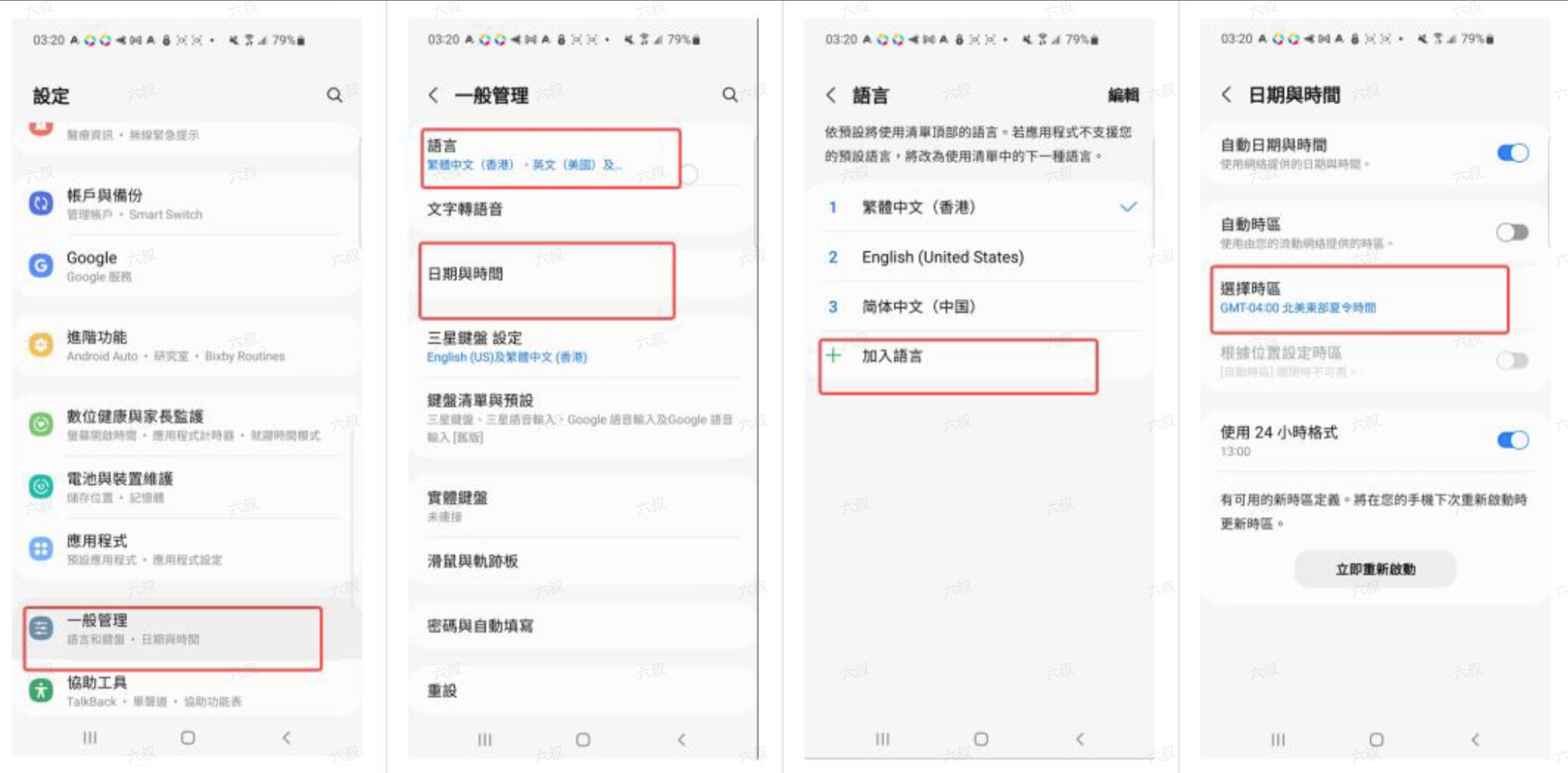
1. Open **Settings** and set your **time zone**, **language**, and **region** to match the proxy IP's target country or region. Menu names vary by Android device. Choose the target country's language and avoid using Simplified Chinese.
<Frame>
  <img src="https://mintcdn.com/miya-556b3641/O3phwvGYo_Abg4HD/images/tutorials/o_and_nb_1.png?fit=max&auto=format&n=O3phwvGYo_Abg4HD&q=85&s=efa50547fa9be4cbfa461a4f8e932d1d" alt="Adjust the date, time, language, and region on Android" style={{ width: "100%", maxWidth: "480px" }} width="2076" height="1023" data-path="images/tutorials/o_and_nb_1.png" />
</Frame>

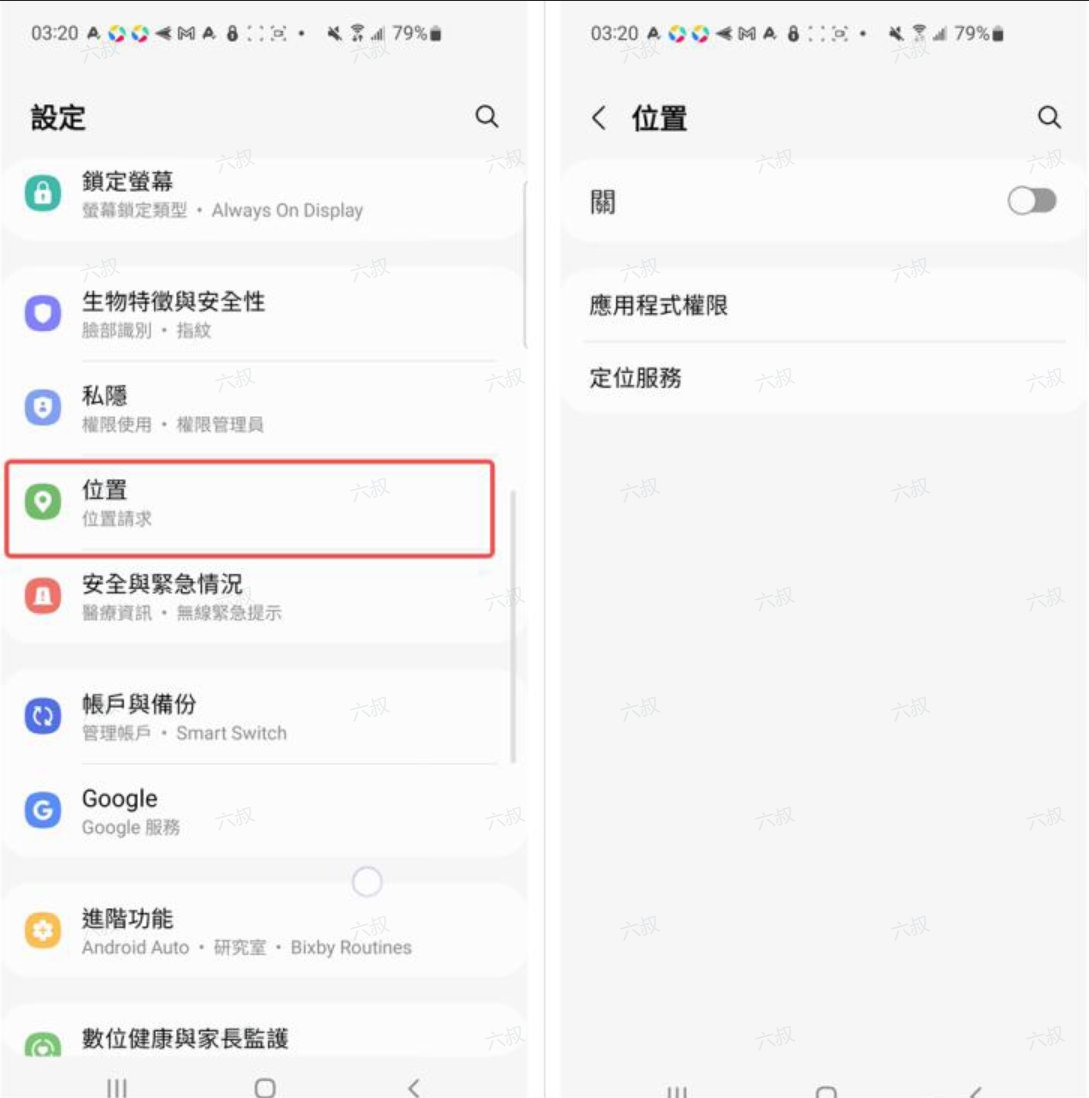
2. Find **Location** in **Settings** and turn it off.
<Frame>
  <img src="https://mintcdn.com/miya-556b3641/O3phwvGYo_Abg4HD/images/tutorials/o_and_nb_2.png?fit=max&auto=format&n=O3phwvGYo_Abg4HD&q=85&s=2390dcdfc82686f86f359a9462d11371" alt="Turn off Location in Android settings" style={{ width: "100%", maxWidth: "480px" }} width="1089" height="1098" data-path="images/tutorials/o_and_nb_2.png" />
</Frame>

See [Device preparation](/device-preparation) for more details.

## Before you connect

* Install **NekoBox** on your Android phone and prepare a working overseas network subscription URL for your first network hop.
* Get the SOCKS5 credentials for your static residential **Native proxy** from the MiyaIP dashboard: **host, port, username, and password**.

## Configuration steps

<Steps>
  <Step title="Add a node">
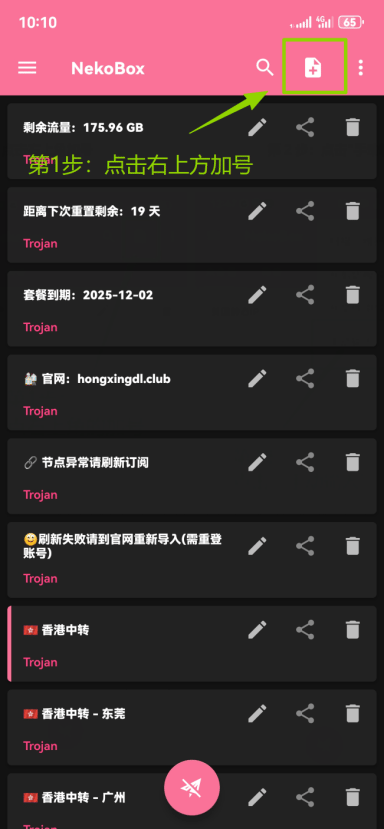
    Open NekoBox and tap the **plus button** in the upper-right corner of the home screen.
    <Frame>
      <img src="https://mintcdn.com/miya-556b3641/O3phwvGYo_Abg4HD/images/tutorials/o_and_nb_3.png?fit=max&auto=format&n=O3phwvGYo_Abg4HD&q=85&s=dbd7a5392bba739393a8195bad6f3157" alt="Tap the plus button in the upper-right corner of NekoBox" style={{ width: "100%", maxWidth: "480px" }} width="384" height="829" data-path="images/tutorials/o_and_nb_3.png" />
    </Frame>
  </Step>

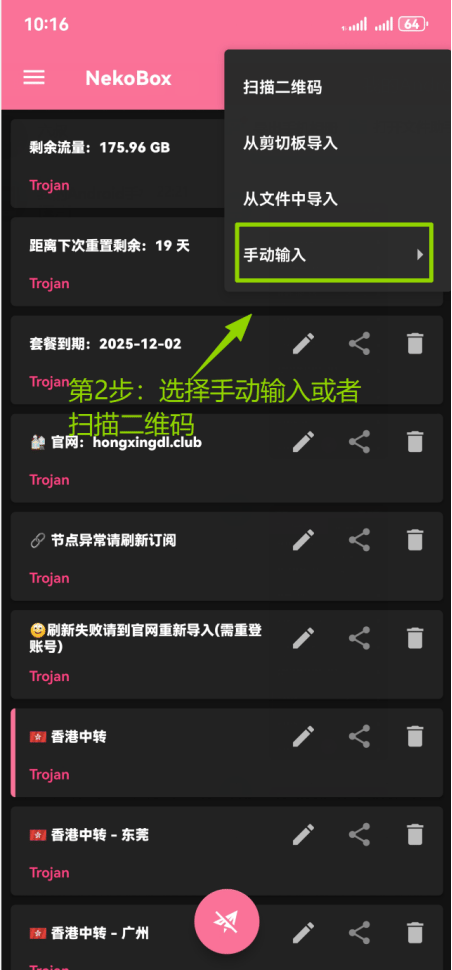
  <Step title="Select Manual input">
    Tap **Manual input** in the add menu.

    <Frame>
      <img src="https://mintcdn.com/miya-556b3641/O3phwvGYo_Abg4HD/images/tutorials/o_and_nb_4.png?fit=max&auto=format&n=O3phwvGYo_Abg4HD&q=85&s=8c57ec2400598e2b553fdc7232338a4d" alt="Select Manual input in the NekoBox add menu" style={{ width: "100%", maxWidth: "480px" }} width="452" height="970" data-path="images/tutorials/o_and_nb_4.png" />
    </Frame>
  </Step>

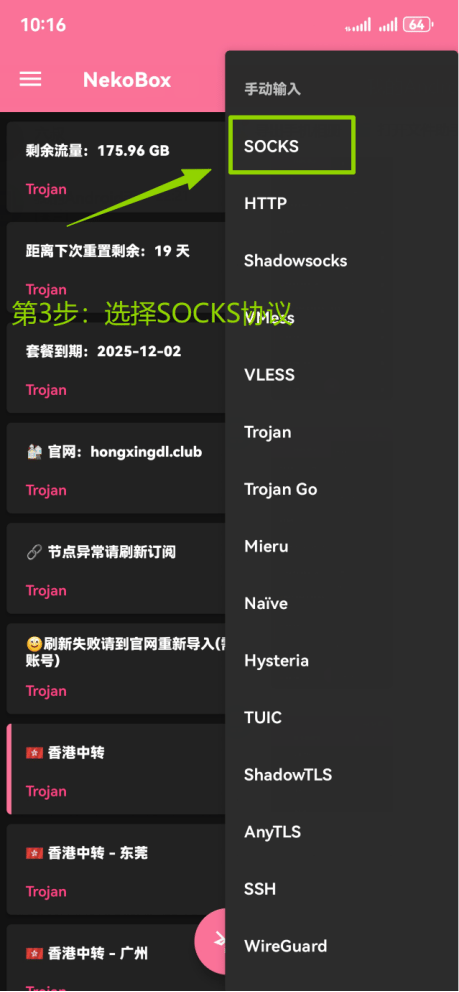
  <Step title="Select the SOCKS protocol">
    Tap **SOCKS** in the protocol list.

    <Frame>
      <img src="https://mintcdn.com/miya-556b3641/O3phwvGYo_Abg4HD/images/tutorials/o_and_nb_5.png?fit=max&auto=format&n=O3phwvGYo_Abg4HD&q=85&s=ca3c683eb5a879380138b4eb57475059" alt="Select SOCKS in the NekoBox protocol list" style={{ width: "100%", maxWidth: "480px" }} width="459" height="992" data-path="images/tutorials/o_and_nb_5.png" />
    </Frame>
  </Step>

  <Step title="Enter your MiyaIP proxy details">
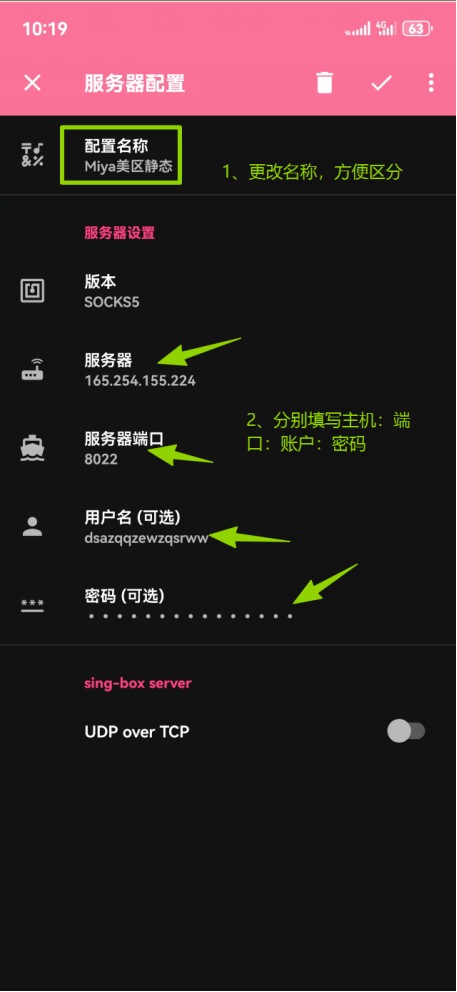
    Enter a recognizable **Name**. Fill in your MiyaIP native proxy **host, port, username, and password**, confirm that you use **SOCKS5**, then tap **✓** in the upper-right corner to save.
    <Frame>
      <img src="https://mintcdn.com/miya-556b3641/O3phwvGYo_Abg4HD/images/tutorials/o_and_nb_6.png?fit=max&auto=format&n=O3phwvGYo_Abg4HD&q=85&s=03580b6366b8bb98b8ab7d6f60b3142a" alt="Enter the MiyaIP SOCKS5 proxy details and save the node" style={{ width: "100%", maxWidth: "480px" }} width="457" height="992" data-path="images/tutorials/o_and_nb_6.png" />
    </Frame>
  </Step>

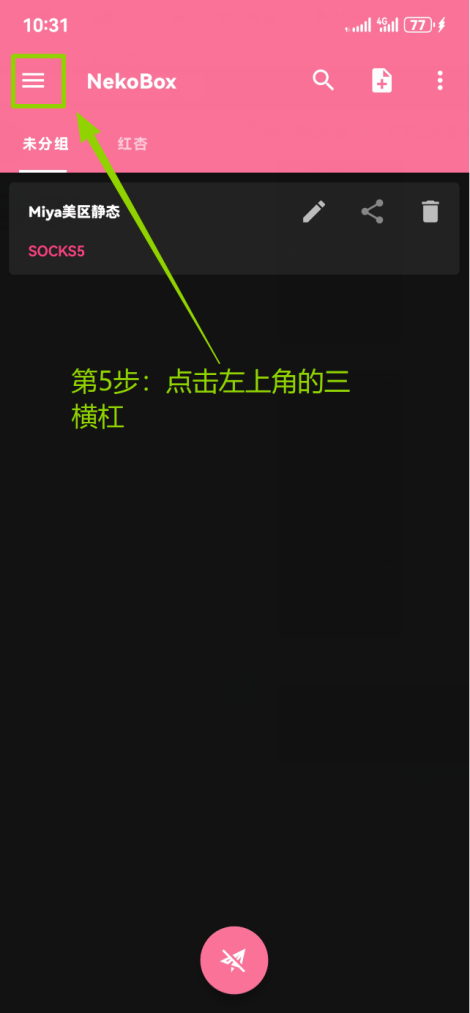
  <Step title="Open the side menu">
    Tap the **three-line menu button** in the upper-left corner.
    <Frame>
      <img src="https://mintcdn.com/miya-556b3641/O3phwvGYo_Abg4HD/images/tutorials/o_and_nb_7.png?fit=max&auto=format&n=O3phwvGYo_Abg4HD&q=85&s=f50253b1c5d4b00a122ff6028e44a006" alt="Tap the menu button in the upper-left corner of NekoBox" style={{ width: "100%", maxWidth: "480px" }} width="470" height="1013" data-path="images/tutorials/o_and_nb_7.png" />
    </Frame>
  </Step>

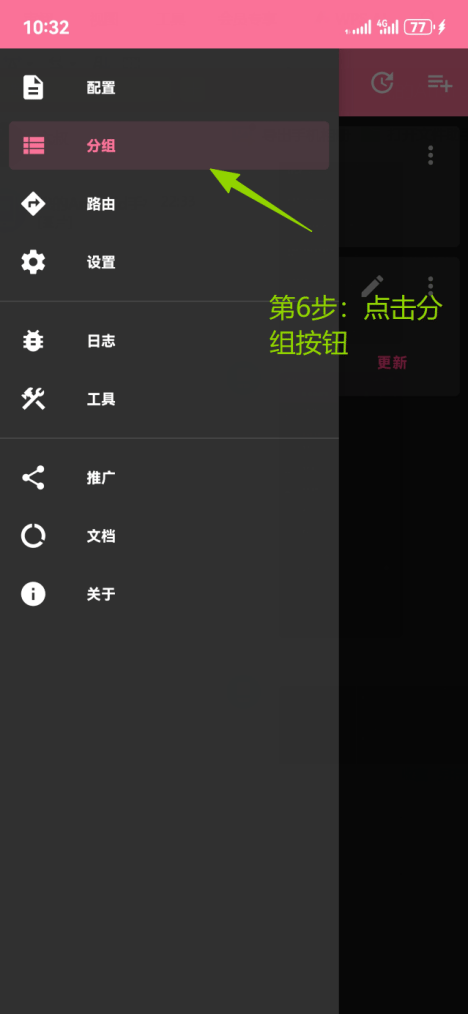
  <Step title="Open Groups">
    Tap **Groups** in the side menu.

    <Frame>
      <img src="https://mintcdn.com/miya-556b3641/O3phwvGYo_Abg4HD/images/tutorials/o_and_nb_8.png?fit=max&auto=format&n=O3phwvGYo_Abg4HD&q=85&s=f1ab35ae3a84ce97ef1f11a794eda33e" alt="Open Groups from the NekoBox side menu" style={{ width: "100%", maxWidth: "480px" }} width="468" height="1014" data-path="images/tutorials/o_and_nb_8.png" />
    </Frame>
  </Step>

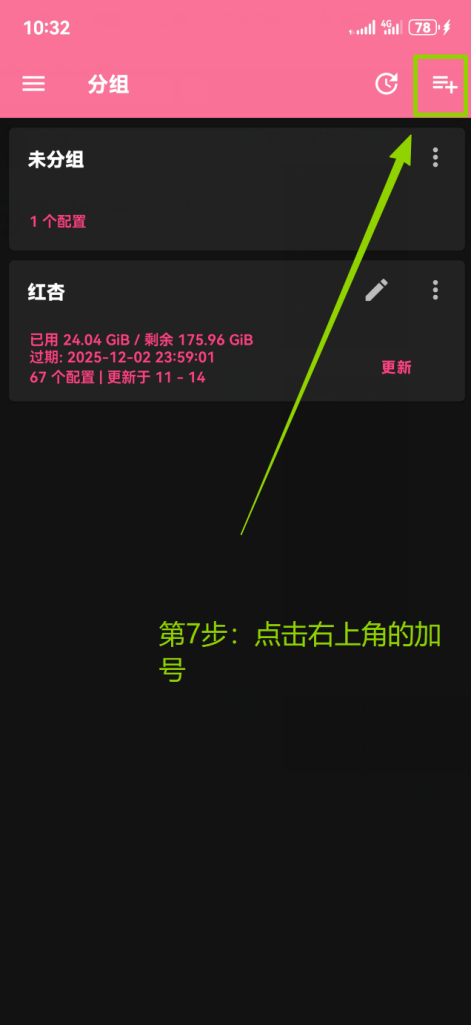
  <Step title="Add a group">
    Tap the **plus button** in the upper-right corner of the Groups page.
    <Frame>
      <img src="https://mintcdn.com/miya-556b3641/O3phwvGYo_Abg4HD/images/tutorials/o_and_nb_9.png?fit=max&auto=format&n=O3phwvGYo_Abg4HD&q=85&s=561da6bddf4b27e69c299ec3d1f81fac" alt="Tap the plus button on the Groups page" style={{ width: "100%", maxWidth: "480px" }} width="472" height="1025" data-path="images/tutorials/o_and_nb_9.png" />
    </Frame>
  </Step>

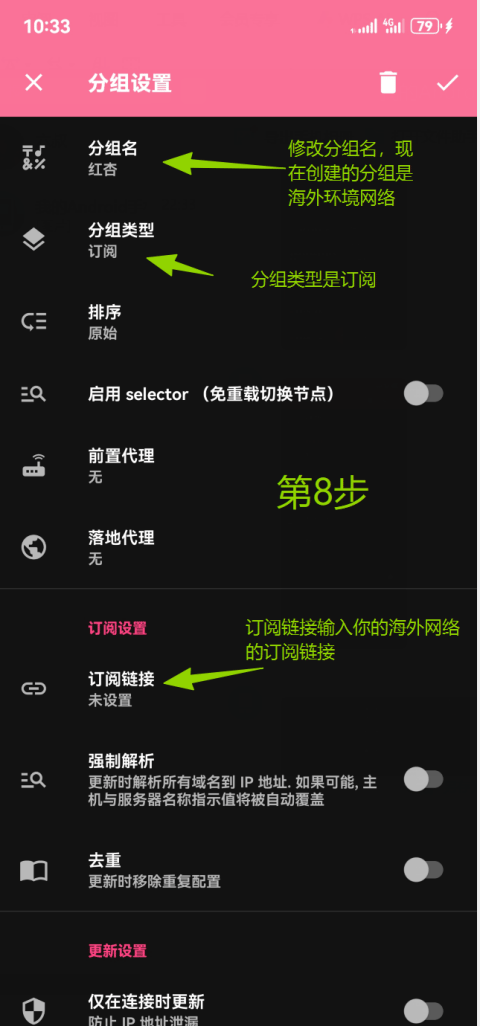
  <Step title="Enter your overseas subscription">
    Enter a **group name** and change the **group type** to **Subscription**. Paste your existing overseas network subscription URL into **Subscription link**, then tap **✓** in the upper-right corner to save.
    <Frame>
      <img src="https://mintcdn.com/miya-556b3641/O3phwvGYo_Abg4HD/images/tutorials/o_and_nb_10.png?fit=max&auto=format&n=O3phwvGYo_Abg4HD&q=85&s=73a4fb0b00c22c310f7570e0f2450e51" alt="Create a subscription group with your existing overseas subscription URL" style={{ width: "100%", maxWidth: "480px" }} width="480" height="1027" data-path="images/tutorials/o_and_nb_10.png" />
    </Frame>
  </Step>

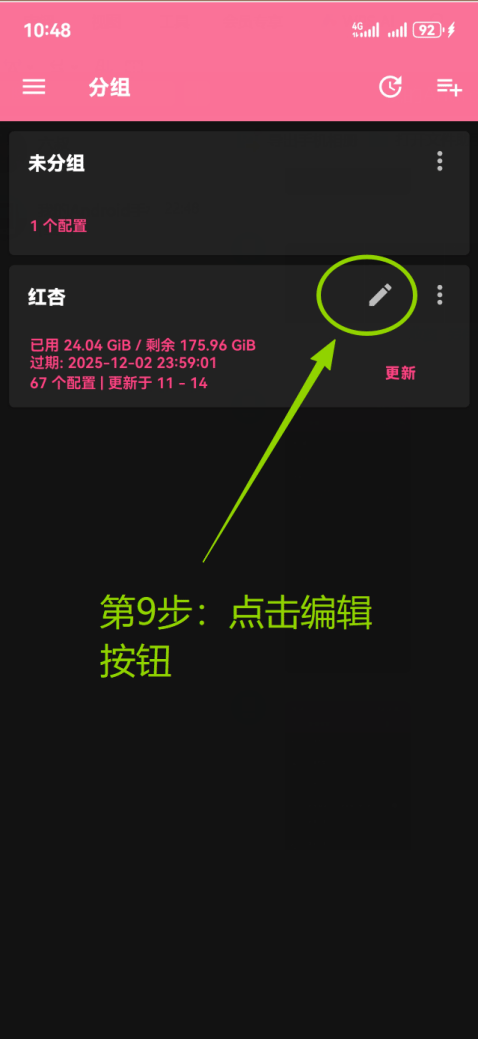
  <Step title="Edit the subscription group">
    Find the overseas subscription group you just created and tap **Edit**.
    <Frame>
      <img src="https://mintcdn.com/miya-556b3641/O3phwvGYo_Abg4HD/images/tutorials/o_and_nb_11.png?fit=max&auto=format&n=O3phwvGYo_Abg4HD&q=85&s=2840e5c6dedcabab67db7df348d47a08" alt="Edit the overseas subscription group you just created" style={{ width: "100%", maxWidth: "480px" }} width="478" height="1039" data-path="images/tutorials/o_and_nb_11.png" />
    </Frame>
  </Step>

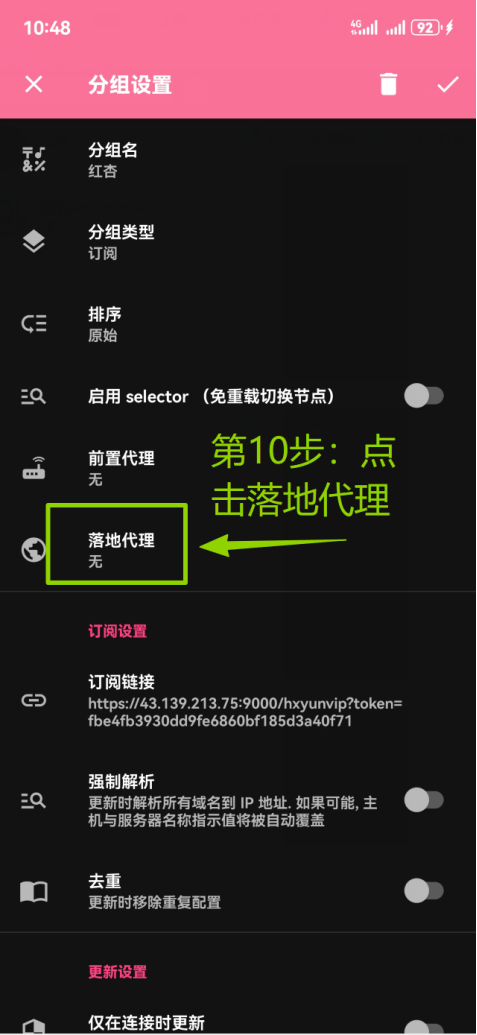
  <Step title="Set the Landing proxy">
    Tap **Landing proxy** in the group settings.
    <Frame>
      <img src="https://mintcdn.com/miya-556b3641/O3phwvGYo_Abg4HD/images/tutorials/o_and_nb_12.png?fit=max&auto=format&n=O3phwvGYo_Abg4HD&q=85&s=36e04fbc808425687f766b6a9167b800" alt="Open Landing proxy in the subscription group settings" style={{ width: "100%", maxWidth: "480px" }} width="477" height="1035" data-path="images/tutorials/o_and_nb_12.png" />
    </Frame>
  </Step>

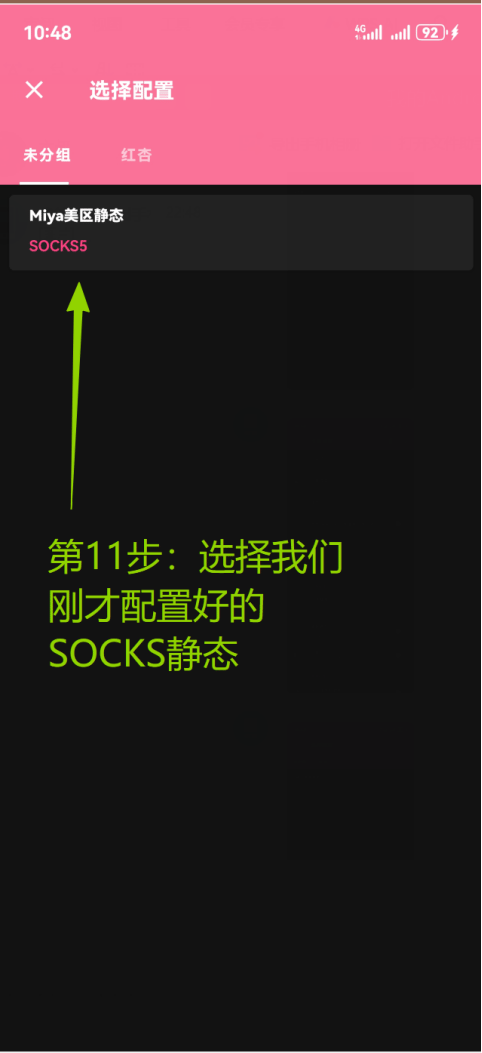
  <Step title="Select your MiyaIP static IP node">
    Select the **MiyaIP SOCKS5 node** you saved earlier as the group's Landing proxy.
    <Frame>
      <img src="https://mintcdn.com/miya-556b3641/O3phwvGYo_Abg4HD/images/tutorials/o_and_nb_13.png?fit=max&auto=format&n=O3phwvGYo_Abg4HD&q=85&s=ca969d19043f69a1a37a974d82ae7669" alt="Select the MiyaIP static IP node as the Landing proxy" style={{ width: "100%", maxWidth: "480px" }} width="482" height="1053" data-path="images/tutorials/o_and_nb_13.png" />
    </Frame>
  </Step>

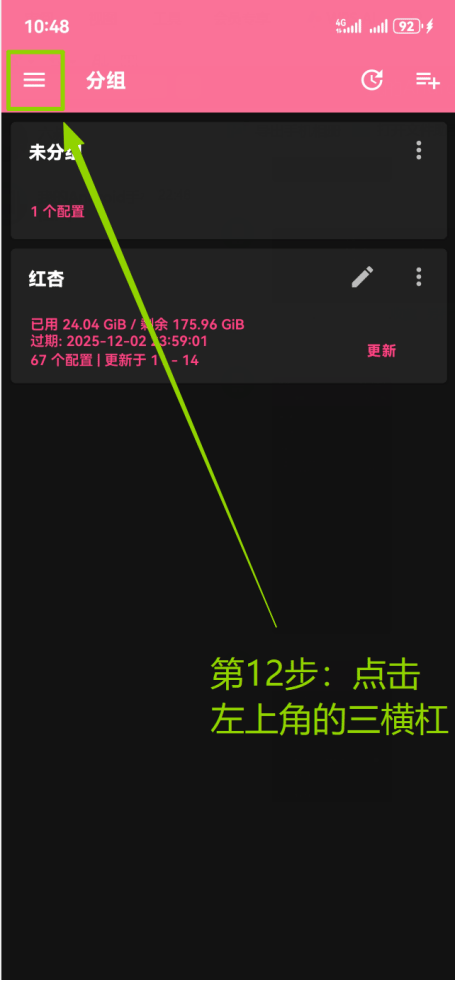
  <Step title="Open the side menu again">
    Tap the **three-line menu button** in the upper-left corner.
    <Frame>
      <img src="https://mintcdn.com/miya-556b3641/O3phwvGYo_Abg4HD/images/tutorials/o_and_nb_14.png?fit=max&auto=format&n=O3phwvGYo_Abg4HD&q=85&s=85479361b6d45ad1a2cfb444901d601b" alt="Open the NekoBox side menu again" style={{ width: "100%", maxWidth: "480px" }} width="455" height="981" data-path="images/tutorials/o_and_nb_14.png" />
    </Frame>
  </Step>

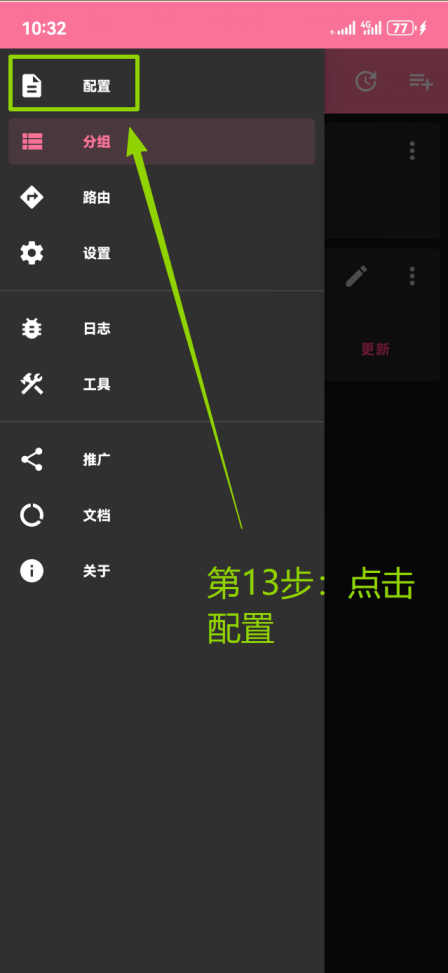
  <Step title="Return to Config">
    Tap **Config** in the side menu.

    <Frame>
      <img src="https://mintcdn.com/miya-556b3641/O3phwvGYo_Abg4HD/images/tutorials/o_and_nb_15.png?fit=max&auto=format&n=O3phwvGYo_Abg4HD&q=85&s=f76d9c67e526294a9896eab963346bc5" alt="Open the Config page from the NekoBox side menu" style={{ width: "100%", maxWidth: "480px" }} width="448" height="973" data-path="images/tutorials/o_and_nb_15.png" />
    </Frame>
  </Step>

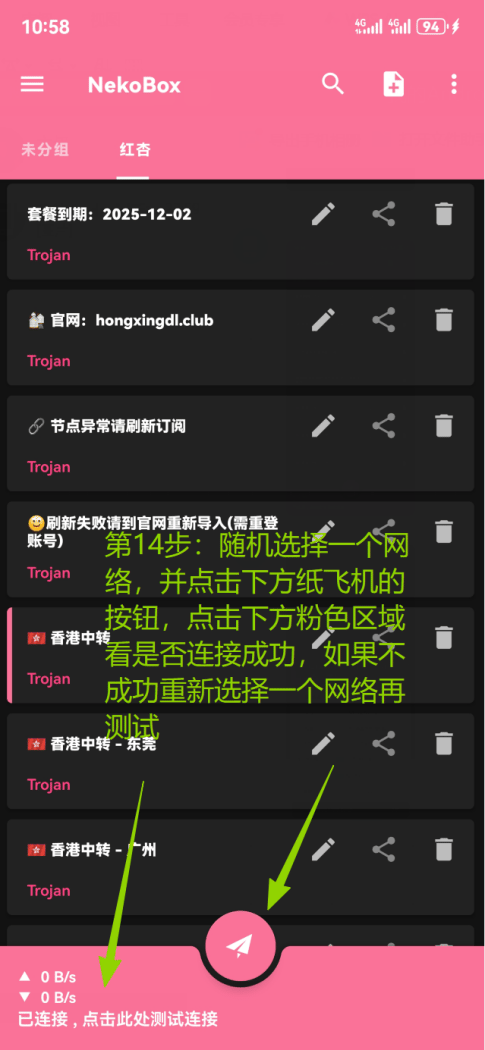
  <Step title="Connect and test latency">
    Select an **overseas network node** in the overseas subscription group. Tap the **paper airplane button** to connect, then tap the **pink area** to run a handshake latency test.
    <Frame>
      <img src="https://mintcdn.com/miya-556b3641/O3phwvGYo_Abg4HD/images/tutorials/o_and_nb_16.png?fit=max&auto=format&n=O3phwvGYo_Abg4HD&q=85&s=1749d088a13dc50a7cc0efac431044d7" alt="Select an overseas node, connect, and tap the pink area to test latency" style={{ width: "100%", maxWidth: "480px" }} width="485" height="1050" data-path="images/tutorials/o_and_nb_16.png" />
    </Frame>
  </Step>

  <Step title="Verify your exit IP">
    Open [whoer.net](https://whoer.net) in your browser. Confirm that the displayed **IP address** matches the MiyaIP static residential IP you purchased and that the **country or region** is correct.
  </Step>
</Steps>