> ## Documentation Index
> Fetch the complete documentation index at: https://help.miyaip.com/llms.txt
> Use this file to discover all available pages before exploring further.
# Test a static proxy with curl and Python
> Verify a static proxy exit IP with curl and Python, compare direct and proxied requests, and troubleshoot protocol and authentication failures.
Configure one static residential proxy, then compare its actual exit with your dashboard allocation. Use this workflow to verify connectivity, authentication, and short-term exit continuity. An IP lookup does not verify geolocation or long-term availability.
## Prepare connection fields
Open your [purchased static residential IPs](/proxy/static-residential/quick-start). Record these fields and confirm that the plan is active.
| Field | Where to find it | Check before use |
| - | - | - |
| Protocol | Protocol notes in the proxy record | Use HTTP or SOCKS5 supported by both the endpoint and client |
| Host and port | Native or relay proxy details | The connection host is separate from the exit IP; its port is separate from a local client listening port |
| Username and password | Authentication fields for the selected proxy | Copy separately and treat both as secrets |
| Exit IP | Separate exit IP details | Set `EXPECTED_EXIT_IP` and compare it with lookup results |
| Country or state | Allocation details | Match the required location, then verify geolocation separately |
| Expiry time | Purchased IPs or plan details | Rule out expiry before troubleshooting the network or client |
A **Native proxy** used from mainland China needs a working overseas network path. A **Relay proxy** uses the assigned relay host and port. Follow the [purchase and configuration quick start](/proxy/static-residential/quick-start) to get complete fields. Keep the relay host, native connection IP, and final exit IP separate.
## Configure, request, and verify
Select an IP in the location your workload needs. Confirm support for the assigned protocol and username/password authentication. Record the expiry time and concurrency limits.
Under **Purchased IPs**, expand **Native proxy** or **Relay proxy** and copy the host, port, username, and password separately. A complete string commonly uses this order. If a credential contains a colon, use separate fields rather than splitting only on delimiters.
```text theme={null}
PROXY_HOST:PROXY_PORT:PROXY_USER:PROXY_PASSWORD
```
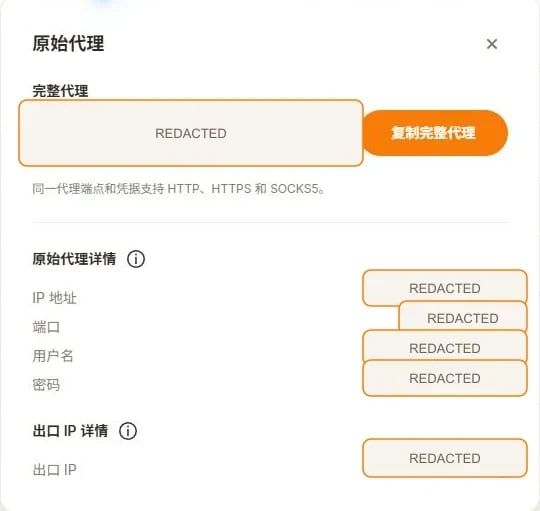 Connection values in the image are redacted. Labels may vary by dashboard version; use the current fields.
All values below are placeholders. Use the selected mode's host and port, and set `EXPECTED_EXIT_IP` to the dashboard's **Exit IP**. Load credentials from a secret manager or enter them interactively in the current terminal. Keep real credentials out of shared scripts and terminal history.
```bash Bash theme={null}
export PROXY_SCHEME="http"
export PROXY_HOST="YOUR_PROXY_HOST"
export PROXY_PORT="YOUR_PROXY_PORT"
export PROXY_USER="YOUR_PROXY_USER"
export PROXY_PASSWORD="YOUR_PROXY_PASSWORD"
export EXPECTED_EXIT_IP="YOUR_DASHBOARD_EXIT_IP"
export VERIFY_INTERVAL_SECONDS="30"
```
```powershell PowerShell theme={null}
$env:PROXY_SCHEME = "http"
$env:PROXY_HOST = "YOUR_PROXY_HOST"
$env:PROXY_PORT = "YOUR_PROXY_PORT"
$env:PROXY_USER = "YOUR_PROXY_USER"
$env:PROXY_PASSWORD = "YOUR_PROXY_PASSWORD"
$env:EXPECTED_EXIT_IP = "YOUR_DASHBOARD_EXIT_IP"
$env:VERIFY_INTERVAL_SECONDS = "30"
```
For HTTP, set `PROXY_SCHEME=http`. For SOCKS5, use `socks5` for local destination DNS or `socks5h` for proxy-side DNS. Use a supported protocol; do not interchange protocols and ports. See [HTTP vs SOCKS5](/guides/protocols).
Run the direct command first, then only the proxy command supported by your endpoint. `--proxy-user` separates credentials from the endpoint. `--noproxy "*"` bypasses curl proxy settings; `--noproxy ""` prevents `NO_PROXY` from excluding the target. On Windows, use `curl.exe`. The PowerShell commands require version 7.3 or newer to pass the empty argument.
```bash Bash theme={null}
# Baseline: do not inherit a curl proxy
curl --fail --show-error --silent --noproxy "*" \
--connect-timeout 10 --max-time 30 \
"https://api.ipify.org?format=json"
# HTTP proxy; the destination still uses HTTPS
curl --fail --show-error --silent --noproxy "" \
--connect-timeout 10 --max-time 30 \
--proxy "http://${PROXY_HOST}:${PROXY_PORT}" \
--proxy-user "${PROXY_USER}:${PROXY_PASSWORD}" \
"https://api.ipify.org?format=json"
# SOCKS5 with local destination DNS
curl --fail --show-error --silent --noproxy "" \
--connect-timeout 10 --max-time 30 \
--proxy "socks5://${PROXY_HOST}:${PROXY_PORT}" \
--proxy-user "${PROXY_USER}:${PROXY_PASSWORD}" \
"https://api.ipify.org?format=json"
# SOCKS5 with proxy-side destination DNS
curl --fail --show-error --silent --noproxy "" \
--connect-timeout 10 --max-time 30 \
--proxy "socks5h://${PROXY_HOST}:${PROXY_PORT}" \
--proxy-user "${PROXY_USER}:${PROXY_PASSWORD}" \
"https://api.ipify.org?format=json"
```
```powershell PowerShell theme={null}
# PowerShell 7.3+ preserves the empty --noproxy argument
curl.exe --fail --show-error --silent --noproxy "*" --connect-timeout 10 --max-time 30 "https://api.ipify.org?format=json"
curl.exe --fail --show-error --silent --noproxy "" --connect-timeout 10 --max-time 30 --proxy "http://${env:PROXY_HOST}:${env:PROXY_PORT}" --proxy-user "${env:PROXY_USER}:${env:PROXY_PASSWORD}" "https://api.ipify.org?format=json"
curl.exe --fail --show-error --silent --noproxy "" --connect-timeout 10 --max-time 30 --proxy "socks5://${env:PROXY_HOST}:${env:PROXY_PORT}" --proxy-user "${env:PROXY_USER}:${env:PROXY_PASSWORD}" "https://api.ipify.org?format=json"
curl.exe --fail --show-error --silent --noproxy "" --connect-timeout 10 --max-time 30 --proxy "socks5h://${env:PROXY_HOST}:${env:PROXY_PORT}" --proxy-user "${env:PROXY_USER}:${env:PROXY_PASSWORD}" "https://api.ipify.org?format=json"
```
The commands should return JSON containing `ip`. Check each command's exit code: `$?` in Bash or `$LASTEXITCODE` in PowerShell. A nonzero value means failure; empty output or an error page is not an exit IP. Compare direct and proxy exits, then compare the proxy result with the dashboard's **Exit IP**.
Create an isolated browser profile, select the same protocol, and enter the host, port, username, and password in separate fields. For the initial check, rule out other system proxies or VPNs, run the client's proxy check, and visit an approved IP lookup page.
Choose your mobile guide by device and connection mode:
* iOS Shadowrocket: [native proxy](/native/ios-shadowrocket) / [relay proxy](/relay/ios-shadowrocket)
* Android NekoBox: [native proxy](/native/android-nekobox) / [relay proxy](/relay/android-nekobox)
* Android v2rayNG: [native proxy](/native/android-v2rayng) / [relay proxy](/relay/android-v2rayng)
For AdsPower, see [static proxy configuration](/integrations/adspower-static-proxy).
Use Python 3.9 or newer. Install Requests with SOCKS support so the same example can handle HTTP and SOCKS5.
```bash theme={null}
python -m pip install "requests[socks]==2.*"
```
Save the complete code below as `static_proxy_check.py`. Run it in the same terminal where you set the variables:
```bash theme={null}
python static_proxy_check.py
```
The script queries a direct baseline, then creates three separate proxy sessions. Between proxy requests, it completes the previous request and waits `VERIFY_INTERVAL_SECONDS`, defaulting to 30 seconds. After the third request, it queries the direct baseline again. Each session sets `trust_env=False` to avoid inherited environment proxies and `.netrc`; a system VPN or transparent forwarding can still affect the baseline.
The script percent-encodes the username and password in the proxy URL and sets separate connect and read timeouts. It prints safe diagnostics, never the complete proxy URL or raw exception. Proxy, TLS, timeout, HTTP status, JSON format, and exit-comparison failures return a nonzero exit code.
A successful check requires the same direct baseline before and after, the same exit in all three proxy requests, and a proxy exit different from both direct results. If you set `EXPECTED_EXIT_IP`, all three must also match that allocation. Otherwise, inspect routing and the current allocation before retrying.
Without `EXPECTED_EXIT_IP`, the output says `expected_exit_matches=not_checked`. That verifies short-term continuity and baseline differences only, not the dashboard allocation. Clear username and password variables from the current terminal when finished.
## Complete Python example
[Download the Python example](/examples/static_proxy_check.py), or save the code below as `static_proxy_check.py`.
```python static_proxy_check.py theme={null}
"""Verify a static proxy without logging credentials.
Python 3.9+. Install: python -m pip install "requests[socks]==2.*"
Set PROXY_HOST, PROXY_PORT, PROXY_USER, and PROXY_PASSWORD.
PROXY_SCHEME: http (default), socks5, or socks5h.
Run: python examples/static_proxy_check.py
This script makes a direct request, three proxy requests separated by an
interval, and a final direct request. It does not test geolocation or uptime.
"""
from datetime import datetime, timezone
from ipaddress import ip_address
import math
import os
import platform
import sys
import time
from urllib.parse import quote, urlsplit
import requests
class CheckError(RuntimeError):
"""A safe diagnostic that contains no proxy credentials."""
def positive_seconds(env, name, default):
try:
value = float(env.get(name, str(default)))
except (TypeError, ValueError):
raise ValueError(f"{name} must be a number") from None
if not math.isfinite(value) or value <= 0:
raise ValueError(f"{name} must be finite and greater than zero")
return value
def configuration(env):
required = ("PROXY_HOST", "PROXY_PORT", "PROXY_USER", "PROXY_PASSWORD")
missing = [name for name in required if not env.get(name)]
if missing:
raise ValueError("Missing environment variables: " + ", ".join(missing))
scheme = env.get("PROXY_SCHEME", "http").strip().lower()
if scheme not in {"http", "socks5", "socks5h"}:
raise ValueError("PROXY_SCHEME must be http, socks5, or socks5h")
host = env["PROXY_HOST"].strip()
if host.startswith("[") and host.endswith("]"):
host = host[1:-1]
if not host or any(c.isspace() or c in "/?#@" for c in host):
raise ValueError("PROXY_HOST must be a hostname or IP without a URL or port")
if ":" in host:
try:
if ip_address(host).version != 6:
raise ValueError
except ValueError:
raise ValueError("Use a valid IPv6 host; keep the port in PROXY_PORT") from None
host = "[" + host + "]"
try:
port = int(env["PROXY_PORT"])
except (TypeError, ValueError):
raise ValueError("PROXY_PORT must be an integer") from None
if not 1 <= port <= 65535:
raise ValueError("PROXY_PORT must be between 1 and 65535")
user = quote(env["PROXY_USER"], safe="")
password = quote(env["PROXY_PASSWORD"], safe="")
proxy_url = f"{scheme}://{user}:{password}@{host}:{port}"
endpoint = env.get("IP_CHECK_URL", "https://api.ipify.org?format=json")
parsed = urlsplit(endpoint)
local_http = parsed.scheme == "http" and parsed.hostname in {"localhost", "127.0.0.1", "::1"}
if not parsed.hostname or (parsed.scheme != "https" and not local_http):
raise ValueError("IP_CHECK_URL must use HTTPS; HTTP loopback is allowed for local tests")
if parsed.username or parsed.password or parsed.fragment:
raise ValueError("IP_CHECK_URL must not contain credentials or a fragment")
expected = env.get("EXPECTED_EXIT_IP", "").strip()
if expected:
try:
expected = str(ip_address(expected))
except ValueError:
raise ValueError("EXPECTED_EXIT_IP must be a valid IP address") from None
return {
"scheme": scheme,
"proxies": {"http": proxy_url, "https": proxy_url},
"endpoint": endpoint,
"expected": expected,
"interval": positive_seconds(env, "VERIFY_INTERVAL_SECONDS", 30),
"timeout": (
positive_seconds(env, "CONNECT_TIMEOUT_SECONDS", 10),
positive_seconds(env, "READ_TIMEOUT_SECONDS", 20),
),
}
def get_ip(endpoint, proxies, timeout):
try:
with requests.Session() as session:
# Ignore HTTP_PROXY, HTTPS_PROXY, ALL_PROXY, NO_PROXY and .netrc.
session.trust_env = False
response = session.get(
endpoint,
proxies=proxies,
timeout=timeout,
allow_redirects=False,
)
response.raise_for_status()
if response.status_code != 200:
raise CheckError(f"unexpected_status={response.status_code}; use an IP JSON endpoint")
try:
payload = response.json()
if not isinstance(payload, dict) or not isinstance(payload.get("ip"), str):
raise ValueError
address = str(ip_address(payload["ip"].strip()))
except (ValueError, TypeError):
raise CheckError("invalid_response: expected JSON with a valid string 'ip' field") from None
return response.status_code, address
except requests.exceptions.ProxyError:
raise CheckError("proxy_error: check protocol, host, port, authentication, and any IP allowlist") from None
except requests.exceptions.SSLError:
raise CheckError("tls_error: check the certificate chain; keep TLS verification enabled") from None
except requests.exceptions.Timeout:
raise CheckError("timeout: check reachability, firewall, DNS, and assigned endpoint") from None
except requests.exceptions.ConnectionError:
raise CheckError("connection_error: check DNS, network access, and the endpoint") from None
except requests.exceptions.HTTPError as error:
status = error.response.status_code if error.response is not None else "unknown"
raise CheckError(f"http_error={status}: check endpoint response and authentication") from None
except requests.exceptions.InvalidSchema:
raise CheckError("unsupported_scheme: install requests[socks] and check PROXY_SCHEME") from None
except requests.exceptions.RequestException:
raise CheckError("request_error: check client configuration; share only a redacted diagnostic") from None
def run(config, sleep=time.sleep, clock=time.monotonic):
print("verified_at_utc=" + datetime.now(timezone.utc).isoformat())
print(f"operating_system={platform.system()} {platform.release()}")
print(f"client=Python {sys.version.split()[0]}, requests {requests.__version__}")
print("proxy_scheme=" + config["scheme"])
print(f"wait_between_proxy_requests_seconds={config['interval']:g}")
before_status, before = get_ip(config["endpoint"], None, config["timeout"])
print(f"direct_before_status={before_status} direct_before_ip={before}")
started = clock()
exits = []
for attempt in range(3):
if attempt:
sleep(config["interval"])
status, address = get_ip(config["endpoint"], config["proxies"], config["timeout"])
exits.append(address)
elapsed = clock() - started
print(f"proxy_check={attempt + 1} elapsed_seconds={elapsed:.3f} status={status} exit_ip={address}")
after_status, after = get_ip(config["endpoint"], None, config["timeout"])
print(f"direct_after_status={after_status} direct_after_ip={after}")
same_exit = len(set(exits)) == 1
baseline_stable = before == after
differs = all(address != before and address != after for address in exits)
expected_matches = not config["expected"] or all(address == config["expected"] for address in exits)
print(f"same_exit={same_exit}")
print(f"direct_baseline_stable={baseline_stable}")
print(f"direct_differs_from_exit={differs}")
print(f"expected_exit_matches={expected_matches if config['expected'] else 'not_checked'}")
if not (same_exit and baseline_stable and differs and expected_matches):
raise CheckError("verification_failed: inspect routing, baseline changes, and the current allocation")
print("verification_passed=True")
return 0
def main():
try:
return run(configuration(os.environ))
except (ValueError, CheckError) as error:
# Only our own safe messages are printed, never raw Requests exceptions.
print(str(error), file=sys.stderr)
return 1
except KeyboardInterrupt:
print("verification_interrupted", file=sys.stderr)
return 130
if __name__ == "__main__":
sys.exit(main())
```
Besides connection variables, you can set `CONNECT_TIMEOUT_SECONDS` (default 10), `READ_TIMEOUT_SECONDS` (default 20), and `VERIFY_INTERVAL_SECONDS` (default 30). Each must be positive. The default lookup is `https://api.ipify.org?format=json`. You can set `IP_CHECK_URL` to another approved HTTPS endpoint returning `{"ip": "valid IP address"}`; HTTP loopback is allowed for local offline tests.
## Expected output format
This shows the fields of a successful run, using placeholder addresses and timestamps. Run the script yourself to obtain a result.
```text theme={null}
verified_at_utc=YOUR_RUN_TIMESTAMP
operating_system=YOUR_OS
client=Python YOUR_VERSION, requests YOUR_VERSION
proxy_scheme=http
wait_between_proxy_requests_seconds=30
direct_before_status=200 direct_before_ip=DIRECT_IP
proxy_check=1 elapsed_seconds=... status=200 exit_ip=ALLOCATED_IP
proxy_check=2 elapsed_seconds=... status=200 exit_ip=ALLOCATED_IP
proxy_check=3 elapsed_seconds=... status=200 exit_ip=ALLOCATED_IP
direct_after_status=200 direct_after_ip=DIRECT_IP
same_exit=True
direct_baseline_stable=True
direct_differs_from_exit=True
expected_exit_matches=True
verification_passed=True
```
`elapsed_seconds` includes real request time and waiting, so it will not equal exactly 0, 30, and 60. Three matching results verify continuity only within this window. When sharing a record, retain UTC time, client versions, protocol, interval, status codes, and comparisons. Redact endpoint and IP addresses and omit credentials.
## Troubleshoot by symptom
| Symptom | Check | Next action |
| - | - | - |
| HTTP 407 or `proxy_error` | Username, password, field order, protocol/port, plan status, and any applicable IP allowlist | Copy credentials again and retry with `--proxy-user`; reset credentials if necessary |
| Timeout or `connection_error` | Host DNS, port, outbound firewall, the overseas path needed for a native proxy, and conflicting VPNs | Use the assigned or support-recommended gateway and retain a redacted time and target |
| `unsupported_scheme` | Installation of `requests[socks]` and the endpoint's compatibility with `PROXY_SCHEME` | Install dependencies and select a mutually supported protocol |
| `tls_error` | Target certificate chain or unexpected TLS interception | Check certificates and network policy; keep verification enabled instead of using `--insecure` or `verify=False` |
| `invalid_response` or non-200 status | Whether the lookup returns JSON, a redirect, or an error page | Use an HTTPS endpoint with an `ip` field; this example rejects redirects |
| Proxy request returns the direct IP | Selected node, browser profile, local forwarding, other VPNs, and system routing | Fix routing and inspect the connection host with `curl -v`; redact logs before sharing |
| `same_exit=False` or allocation mismatch | Rotating endpoint, current allocation, expiry, or operational replacement | Compare with the current dashboard record and ask support to review if needed |
| `direct_baseline_stable=False` | System VPN, network changes, or a changing direct exit | Stabilize the baseline and rerun; this comparison cannot establish proxy failure |
| Wrong country or state | Dashboard allocation and two approved IP databases; country-level versus state-level results | Geolocation is an estimate; request review or replacement if it affects your task |
Give support the UTC time, client version, target, exit code, and redacted diagnostic. Omit passwords and complete authentication strings.
## Frequently asked questions
Choose a protocol supported by both your endpoint and client. HTTP handles web requests. SOCKS5 supports compatible clients and more TCP protocols; socks5h sends destination hostnames to the proxy for resolution.
No. Static allocations usually retain continuity during their valid period, but can expire or be replaced under provider policy. Check expiry and verify the exit before an important workflow.
Check plan concurrency and usage rules first, and isolate unrelated environments and credentials. Technical reuse does not imply unlimited concurrency is permitted.
No. This script checks addresses and continuity only. Compare country, state, ASN, or ISP separately against independent geolocation results and your allocation.
The [Requests proxy and SOCKS documentation](https://requests.readthedocs.io/en/latest/user/advanced/#proxies) explains proxy configuration and DNS modes. The [curl manual](https://curl.se/docs/manpage.html) lists proxy, authentication, and timeout options.
[MiyaIP original guide: static residential proxy setup and verification](https://miyaip.com/blog/how-to-use-static-residential-proxies).
This documentation is built and hosted on [Mintlify](https://mintlify.com), a developer documentation platform.
Connection values in the image are redacted. Labels may vary by dashboard version; use the current fields.
All values below are placeholders. Use the selected mode's host and port, and set `EXPECTED_EXIT_IP` to the dashboard's **Exit IP**. Load credentials from a secret manager or enter them interactively in the current terminal. Keep real credentials out of shared scripts and terminal history.
```bash Bash theme={null}
export PROXY_SCHEME="http"
export PROXY_HOST="YOUR_PROXY_HOST"
export PROXY_PORT="YOUR_PROXY_PORT"
export PROXY_USER="YOUR_PROXY_USER"
export PROXY_PASSWORD="YOUR_PROXY_PASSWORD"
export EXPECTED_EXIT_IP="YOUR_DASHBOARD_EXIT_IP"
export VERIFY_INTERVAL_SECONDS="30"
```
```powershell PowerShell theme={null}
$env:PROXY_SCHEME = "http"
$env:PROXY_HOST = "YOUR_PROXY_HOST"
$env:PROXY_PORT = "YOUR_PROXY_PORT"
$env:PROXY_USER = "YOUR_PROXY_USER"
$env:PROXY_PASSWORD = "YOUR_PROXY_PASSWORD"
$env:EXPECTED_EXIT_IP = "YOUR_DASHBOARD_EXIT_IP"
$env:VERIFY_INTERVAL_SECONDS = "30"
```
For HTTP, set `PROXY_SCHEME=http`. For SOCKS5, use `socks5` for local destination DNS or `socks5h` for proxy-side DNS. Use a supported protocol; do not interchange protocols and ports. See [HTTP vs SOCKS5](/guides/protocols).
Run the direct command first, then only the proxy command supported by your endpoint. `--proxy-user` separates credentials from the endpoint. `--noproxy "*"` bypasses curl proxy settings; `--noproxy ""` prevents `NO_PROXY` from excluding the target. On Windows, use `curl.exe`. The PowerShell commands require version 7.3 or newer to pass the empty argument.
```bash Bash theme={null}
# Baseline: do not inherit a curl proxy
curl --fail --show-error --silent --noproxy "*" \
--connect-timeout 10 --max-time 30 \
"https://api.ipify.org?format=json"
# HTTP proxy; the destination still uses HTTPS
curl --fail --show-error --silent --noproxy "" \
--connect-timeout 10 --max-time 30 \
--proxy "http://${PROXY_HOST}:${PROXY_PORT}" \
--proxy-user "${PROXY_USER}:${PROXY_PASSWORD}" \
"https://api.ipify.org?format=json"
# SOCKS5 with local destination DNS
curl --fail --show-error --silent --noproxy "" \
--connect-timeout 10 --max-time 30 \
--proxy "socks5://${PROXY_HOST}:${PROXY_PORT}" \
--proxy-user "${PROXY_USER}:${PROXY_PASSWORD}" \
"https://api.ipify.org?format=json"
# SOCKS5 with proxy-side destination DNS
curl --fail --show-error --silent --noproxy "" \
--connect-timeout 10 --max-time 30 \
--proxy "socks5h://${PROXY_HOST}:${PROXY_PORT}" \
--proxy-user "${PROXY_USER}:${PROXY_PASSWORD}" \
"https://api.ipify.org?format=json"
```
```powershell PowerShell theme={null}
# PowerShell 7.3+ preserves the empty --noproxy argument
curl.exe --fail --show-error --silent --noproxy "*" --connect-timeout 10 --max-time 30 "https://api.ipify.org?format=json"
curl.exe --fail --show-error --silent --noproxy "" --connect-timeout 10 --max-time 30 --proxy "http://${env:PROXY_HOST}:${env:PROXY_PORT}" --proxy-user "${env:PROXY_USER}:${env:PROXY_PASSWORD}" "https://api.ipify.org?format=json"
curl.exe --fail --show-error --silent --noproxy "" --connect-timeout 10 --max-time 30 --proxy "socks5://${env:PROXY_HOST}:${env:PROXY_PORT}" --proxy-user "${env:PROXY_USER}:${env:PROXY_PASSWORD}" "https://api.ipify.org?format=json"
curl.exe --fail --show-error --silent --noproxy "" --connect-timeout 10 --max-time 30 --proxy "socks5h://${env:PROXY_HOST}:${env:PROXY_PORT}" --proxy-user "${env:PROXY_USER}:${env:PROXY_PASSWORD}" "https://api.ipify.org?format=json"
```
The commands should return JSON containing `ip`. Check each command's exit code: `$?` in Bash or `$LASTEXITCODE` in PowerShell. A nonzero value means failure; empty output or an error page is not an exit IP. Compare direct and proxy exits, then compare the proxy result with the dashboard's **Exit IP**.
Create an isolated browser profile, select the same protocol, and enter the host, port, username, and password in separate fields. For the initial check, rule out other system proxies or VPNs, run the client's proxy check, and visit an approved IP lookup page.
Choose your mobile guide by device and connection mode:
* iOS Shadowrocket: [native proxy](/native/ios-shadowrocket) / [relay proxy](/relay/ios-shadowrocket)
* Android NekoBox: [native proxy](/native/android-nekobox) / [relay proxy](/relay/android-nekobox)
* Android v2rayNG: [native proxy](/native/android-v2rayng) / [relay proxy](/relay/android-v2rayng)
For AdsPower, see [static proxy configuration](/integrations/adspower-static-proxy).
Use Python 3.9 or newer. Install Requests with SOCKS support so the same example can handle HTTP and SOCKS5.
```bash theme={null}
python -m pip install "requests[socks]==2.*"
```
Save the complete code below as `static_proxy_check.py`. Run it in the same terminal where you set the variables:
```bash theme={null}
python static_proxy_check.py
```
The script queries a direct baseline, then creates three separate proxy sessions. Between proxy requests, it completes the previous request and waits `VERIFY_INTERVAL_SECONDS`, defaulting to 30 seconds. After the third request, it queries the direct baseline again. Each session sets `trust_env=False` to avoid inherited environment proxies and `.netrc`; a system VPN or transparent forwarding can still affect the baseline.
The script percent-encodes the username and password in the proxy URL and sets separate connect and read timeouts. It prints safe diagnostics, never the complete proxy URL or raw exception. Proxy, TLS, timeout, HTTP status, JSON format, and exit-comparison failures return a nonzero exit code.
A successful check requires the same direct baseline before and after, the same exit in all three proxy requests, and a proxy exit different from both direct results. If you set `EXPECTED_EXIT_IP`, all three must also match that allocation. Otherwise, inspect routing and the current allocation before retrying.
Without `EXPECTED_EXIT_IP`, the output says `expected_exit_matches=not_checked`. That verifies short-term continuity and baseline differences only, not the dashboard allocation. Clear username and password variables from the current terminal when finished.
## Complete Python example
[Download the Python example](/examples/static_proxy_check.py), or save the code below as `static_proxy_check.py`.
```python static_proxy_check.py theme={null}
"""Verify a static proxy without logging credentials.
Python 3.9+. Install: python -m pip install "requests[socks]==2.*"
Set PROXY_HOST, PROXY_PORT, PROXY_USER, and PROXY_PASSWORD.
PROXY_SCHEME: http (default), socks5, or socks5h.
Run: python examples/static_proxy_check.py
This script makes a direct request, three proxy requests separated by an
interval, and a final direct request. It does not test geolocation or uptime.
"""
from datetime import datetime, timezone
from ipaddress import ip_address
import math
import os
import platform
import sys
import time
from urllib.parse import quote, urlsplit
import requests
class CheckError(RuntimeError):
"""A safe diagnostic that contains no proxy credentials."""
def positive_seconds(env, name, default):
try:
value = float(env.get(name, str(default)))
except (TypeError, ValueError):
raise ValueError(f"{name} must be a number") from None
if not math.isfinite(value) or value <= 0:
raise ValueError(f"{name} must be finite and greater than zero")
return value
def configuration(env):
required = ("PROXY_HOST", "PROXY_PORT", "PROXY_USER", "PROXY_PASSWORD")
missing = [name for name in required if not env.get(name)]
if missing:
raise ValueError("Missing environment variables: " + ", ".join(missing))
scheme = env.get("PROXY_SCHEME", "http").strip().lower()
if scheme not in {"http", "socks5", "socks5h"}:
raise ValueError("PROXY_SCHEME must be http, socks5, or socks5h")
host = env["PROXY_HOST"].strip()
if host.startswith("[") and host.endswith("]"):
host = host[1:-1]
if not host or any(c.isspace() or c in "/?#@" for c in host):
raise ValueError("PROXY_HOST must be a hostname or IP without a URL or port")
if ":" in host:
try:
if ip_address(host).version != 6:
raise ValueError
except ValueError:
raise ValueError("Use a valid IPv6 host; keep the port in PROXY_PORT") from None
host = "[" + host + "]"
try:
port = int(env["PROXY_PORT"])
except (TypeError, ValueError):
raise ValueError("PROXY_PORT must be an integer") from None
if not 1 <= port <= 65535:
raise ValueError("PROXY_PORT must be between 1 and 65535")
user = quote(env["PROXY_USER"], safe="")
password = quote(env["PROXY_PASSWORD"], safe="")
proxy_url = f"{scheme}://{user}:{password}@{host}:{port}"
endpoint = env.get("IP_CHECK_URL", "https://api.ipify.org?format=json")
parsed = urlsplit(endpoint)
local_http = parsed.scheme == "http" and parsed.hostname in {"localhost", "127.0.0.1", "::1"}
if not parsed.hostname or (parsed.scheme != "https" and not local_http):
raise ValueError("IP_CHECK_URL must use HTTPS; HTTP loopback is allowed for local tests")
if parsed.username or parsed.password or parsed.fragment:
raise ValueError("IP_CHECK_URL must not contain credentials or a fragment")
expected = env.get("EXPECTED_EXIT_IP", "").strip()
if expected:
try:
expected = str(ip_address(expected))
except ValueError:
raise ValueError("EXPECTED_EXIT_IP must be a valid IP address") from None
return {
"scheme": scheme,
"proxies": {"http": proxy_url, "https": proxy_url},
"endpoint": endpoint,
"expected": expected,
"interval": positive_seconds(env, "VERIFY_INTERVAL_SECONDS", 30),
"timeout": (
positive_seconds(env, "CONNECT_TIMEOUT_SECONDS", 10),
positive_seconds(env, "READ_TIMEOUT_SECONDS", 20),
),
}
def get_ip(endpoint, proxies, timeout):
try:
with requests.Session() as session:
# Ignore HTTP_PROXY, HTTPS_PROXY, ALL_PROXY, NO_PROXY and .netrc.
session.trust_env = False
response = session.get(
endpoint,
proxies=proxies,
timeout=timeout,
allow_redirects=False,
)
response.raise_for_status()
if response.status_code != 200:
raise CheckError(f"unexpected_status={response.status_code}; use an IP JSON endpoint")
try:
payload = response.json()
if not isinstance(payload, dict) or not isinstance(payload.get("ip"), str):
raise ValueError
address = str(ip_address(payload["ip"].strip()))
except (ValueError, TypeError):
raise CheckError("invalid_response: expected JSON with a valid string 'ip' field") from None
return response.status_code, address
except requests.exceptions.ProxyError:
raise CheckError("proxy_error: check protocol, host, port, authentication, and any IP allowlist") from None
except requests.exceptions.SSLError:
raise CheckError("tls_error: check the certificate chain; keep TLS verification enabled") from None
except requests.exceptions.Timeout:
raise CheckError("timeout: check reachability, firewall, DNS, and assigned endpoint") from None
except requests.exceptions.ConnectionError:
raise CheckError("connection_error: check DNS, network access, and the endpoint") from None
except requests.exceptions.HTTPError as error:
status = error.response.status_code if error.response is not None else "unknown"
raise CheckError(f"http_error={status}: check endpoint response and authentication") from None
except requests.exceptions.InvalidSchema:
raise CheckError("unsupported_scheme: install requests[socks] and check PROXY_SCHEME") from None
except requests.exceptions.RequestException:
raise CheckError("request_error: check client configuration; share only a redacted diagnostic") from None
def run(config, sleep=time.sleep, clock=time.monotonic):
print("verified_at_utc=" + datetime.now(timezone.utc).isoformat())
print(f"operating_system={platform.system()} {platform.release()}")
print(f"client=Python {sys.version.split()[0]}, requests {requests.__version__}")
print("proxy_scheme=" + config["scheme"])
print(f"wait_between_proxy_requests_seconds={config['interval']:g}")
before_status, before = get_ip(config["endpoint"], None, config["timeout"])
print(f"direct_before_status={before_status} direct_before_ip={before}")
started = clock()
exits = []
for attempt in range(3):
if attempt:
sleep(config["interval"])
status, address = get_ip(config["endpoint"], config["proxies"], config["timeout"])
exits.append(address)
elapsed = clock() - started
print(f"proxy_check={attempt + 1} elapsed_seconds={elapsed:.3f} status={status} exit_ip={address}")
after_status, after = get_ip(config["endpoint"], None, config["timeout"])
print(f"direct_after_status={after_status} direct_after_ip={after}")
same_exit = len(set(exits)) == 1
baseline_stable = before == after
differs = all(address != before and address != after for address in exits)
expected_matches = not config["expected"] or all(address == config["expected"] for address in exits)
print(f"same_exit={same_exit}")
print(f"direct_baseline_stable={baseline_stable}")
print(f"direct_differs_from_exit={differs}")
print(f"expected_exit_matches={expected_matches if config['expected'] else 'not_checked'}")
if not (same_exit and baseline_stable and differs and expected_matches):
raise CheckError("verification_failed: inspect routing, baseline changes, and the current allocation")
print("verification_passed=True")
return 0
def main():
try:
return run(configuration(os.environ))
except (ValueError, CheckError) as error:
# Only our own safe messages are printed, never raw Requests exceptions.
print(str(error), file=sys.stderr)
return 1
except KeyboardInterrupt:
print("verification_interrupted", file=sys.stderr)
return 130
if __name__ == "__main__":
sys.exit(main())
```
Besides connection variables, you can set `CONNECT_TIMEOUT_SECONDS` (default 10), `READ_TIMEOUT_SECONDS` (default 20), and `VERIFY_INTERVAL_SECONDS` (default 30). Each must be positive. The default lookup is `https://api.ipify.org?format=json`. You can set `IP_CHECK_URL` to another approved HTTPS endpoint returning `{"ip": "valid IP address"}`; HTTP loopback is allowed for local offline tests.
## Expected output format
This shows the fields of a successful run, using placeholder addresses and timestamps. Run the script yourself to obtain a result.
```text theme={null}
verified_at_utc=YOUR_RUN_TIMESTAMP
operating_system=YOUR_OS
client=Python YOUR_VERSION, requests YOUR_VERSION
proxy_scheme=http
wait_between_proxy_requests_seconds=30
direct_before_status=200 direct_before_ip=DIRECT_IP
proxy_check=1 elapsed_seconds=... status=200 exit_ip=ALLOCATED_IP
proxy_check=2 elapsed_seconds=... status=200 exit_ip=ALLOCATED_IP
proxy_check=3 elapsed_seconds=... status=200 exit_ip=ALLOCATED_IP
direct_after_status=200 direct_after_ip=DIRECT_IP
same_exit=True
direct_baseline_stable=True
direct_differs_from_exit=True
expected_exit_matches=True
verification_passed=True
```
`elapsed_seconds` includes real request time and waiting, so it will not equal exactly 0, 30, and 60. Three matching results verify continuity only within this window. When sharing a record, retain UTC time, client versions, protocol, interval, status codes, and comparisons. Redact endpoint and IP addresses and omit credentials.
## Troubleshoot by symptom
| Symptom | Check | Next action |
| - | - | - |
| HTTP 407 or `proxy_error` | Username, password, field order, protocol/port, plan status, and any applicable IP allowlist | Copy credentials again and retry with `--proxy-user`; reset credentials if necessary |
| Timeout or `connection_error` | Host DNS, port, outbound firewall, the overseas path needed for a native proxy, and conflicting VPNs | Use the assigned or support-recommended gateway and retain a redacted time and target |
| `unsupported_scheme` | Installation of `requests[socks]` and the endpoint's compatibility with `PROXY_SCHEME` | Install dependencies and select a mutually supported protocol |
| `tls_error` | Target certificate chain or unexpected TLS interception | Check certificates and network policy; keep verification enabled instead of using `--insecure` or `verify=False` |
| `invalid_response` or non-200 status | Whether the lookup returns JSON, a redirect, or an error page | Use an HTTPS endpoint with an `ip` field; this example rejects redirects |
| Proxy request returns the direct IP | Selected node, browser profile, local forwarding, other VPNs, and system routing | Fix routing and inspect the connection host with `curl -v`; redact logs before sharing |
| `same_exit=False` or allocation mismatch | Rotating endpoint, current allocation, expiry, or operational replacement | Compare with the current dashboard record and ask support to review if needed |
| `direct_baseline_stable=False` | System VPN, network changes, or a changing direct exit | Stabilize the baseline and rerun; this comparison cannot establish proxy failure |
| Wrong country or state | Dashboard allocation and two approved IP databases; country-level versus state-level results | Geolocation is an estimate; request review or replacement if it affects your task |
Give support the UTC time, client version, target, exit code, and redacted diagnostic. Omit passwords and complete authentication strings.
## Frequently asked questions
Choose a protocol supported by both your endpoint and client. HTTP handles web requests. SOCKS5 supports compatible clients and more TCP protocols; socks5h sends destination hostnames to the proxy for resolution.
No. Static allocations usually retain continuity during their valid period, but can expire or be replaced under provider policy. Check expiry and verify the exit before an important workflow.
Check plan concurrency and usage rules first, and isolate unrelated environments and credentials. Technical reuse does not imply unlimited concurrency is permitted.
No. This script checks addresses and continuity only. Compare country, state, ASN, or ISP separately against independent geolocation results and your allocation.
The [Requests proxy and SOCKS documentation](https://requests.readthedocs.io/en/latest/user/advanced/#proxies) explains proxy configuration and DNS modes. The [curl manual](https://curl.se/docs/manpage.html) lists proxy, authentication, and timeout options.
[MiyaIP original guide: static residential proxy setup and verification](https://miyaip.com/blog/how-to-use-static-residential-proxies).
This documentation is built and hosted on [Mintlify](https://mintlify.com), a developer documentation platform.